Download
1 / 1
10 likes | 137 Views
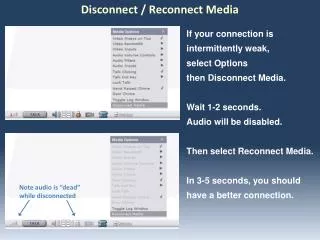
If you're experiencing intermittent audio issues, try the Disconnect and Reconnect Media options. To do this, select Options and then Disconnect Media. Wait for 1-2 seconds, during which the audio will be disabled. After that, select Reconnect Media. In 3-5 seconds, you should notice a significantly improved connection. Please remember that the audio will be muted while the media is disconnected. This simple process can help enhance your overall audio experience.

E N D
Disconnect / Reconnect Media If your connection is intermittently weak, select Options then Disconnect Media. Wait 1-2 seconds. Audio will be disabled. Then select Reconnect Media. In 3-5 seconds, you should have a better connection. Note audio is “dead” while disconnected