Guide to Entering Compressor Serial Numbers for GMCC Models
This guide provides detailed instructions for entering compressor serial numbers, particularly for GMCC units. It highlights the importance of accurate data entry to comply with system requirements. When using the 11-digit serial number, remember to append three zeros to achieve a 14-digit format. Ensure you input the part serial number correctly in the designated fields to select the appropriate part code for defective units in the webCMS. Follow these steps to avoid errors and streamline your service process.

Guide to Entering Compressor Serial Numbers for GMCC Models
E N D
Presentation Transcript
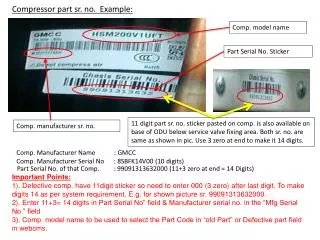
Compressor part sr. no. Example: Comp. model name Part Serial No. Sticker 11 digit part sr. no. sticker pasted on comp. is also available on base of ODU below service valve fixing area. Both sr. no. are same as shown in pic. Use 3 zero at end to make it 14 digits. Comp. manufacturer sr. no. Comp. Manufacturer Name : GMCC Comp.Manufacturer Serial No : 8SBFK14V00 (10 digits) Part Serial No. of that Comp. : 99091313632000(11+3 zero at end = 14 Digits) Important Points: 1). Defective comp.have 11digit sticker so need to enter 000 (3 zero) after last digit. To make digits 14 as per system requirement. E.g. for shown picture sr. 99091313632000. • 2). Enter 11+3= 14 digits inPart Serial No” field & Manufacturer serial no. in the “Mfg Serial No.” field 3). Comp. model name to be used to select the Part Code in “old Part” or Defective part field in webcms.