Download
1 / 1
10 likes | 128 Views
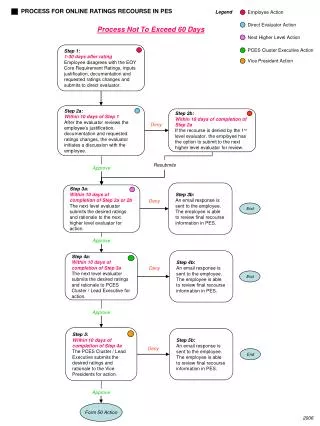
This document outlines the structured process for employees who disagree with their End-of-Year (EOY) Core Requirement Ratings. It details a step-by-step recourse process that must be completed within specified timelines, emphasizing the importance of justification and documentation in rating disputes. Employees initially submit their concerns to their direct evaluator, who reviews and may initiate discussions. If necessary, employees can escalate the issue to higher-level evaluators. The process is designed to ensure fair evaluations and timely responses.

E N D
Employee Action Legend Direct Evaluator Action Next Higher Level Action Vice President Action PCES Cluster Executive Action Step 4a: Within 10 days of completion of Step 3a The next level evaluator submits the desired ratings and rationale to PCES Cluster / Lead Executive for action. Step 5: Within 10 days of completion of Step 4a The PCES Cluster / Lead Executive submits the desired ratings and rationale to the Vice Presidents for action. PROCESS FOR ONLINE RATINGS RECOURSE IN PES Process Not To Exceed 60 Days Step 1: 1-30 days after rating Employee disagrees with the EOY Core Requirement Ratings, inputs justification, documentation and requested ratings changes and submits to direct evaluator. Step 2a: Within 10 days of Step 1 After the evaluator reviews the employee’s justification, documentation and requested ratings changes, the evaluator initiates a discussion with the employee. Step 2b: Within 10 days of completion of Step 2a If the recourse is denied by the 1st level evaluator, the employee has the option to submit to the next higher level evaluator for review. Deny Resubmits Approve Step 3b: An email response is sent to the employee. The employee is able to review final recourse information in PES. Step 3a: Within 10 days of completion of Step 2a or 2b The next level evaluator submits the desired ratings and rationale to the next higher level evaluator for action. Deny End Approve Step 4b: An email response is sent to the employee. The employee is able to review final recourse information in PES. Deny End Approve Step 5b: An email response is sent to the employee. The employee is able to review final recourse information in PES. Deny End Approve Form 50 Action 2006