Download
1 / 2
20 likes | 135 Views
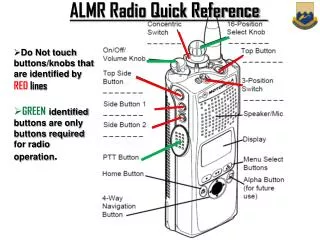
This quick reference guide provides crucial instructions for operating radio equipment effectively. Avoid touching buttons or knobs marked with RED lines, as they are not needed for standard usage. Use GREEN-marked buttons exclusively for operational tasks. Ensure batteries are fully charged, as low power will render radios inoperable. If a "KEY FAILED" message appears, follow the reset procedure. Always check the display to confirm the selected channel and avoid broadcasting on "7BDE BDE ATG" to ensure proper communication.

E N D
ALMR Radio Quick Reference • Do Not touch buttons/knobs that are identified by REDlines • GREENidentified buttons are only buttons required for radio operation.
Turn on/ Raise Volume 1)THISpoints to Current channel 2)NOT THIS USER LEVEL TROUBLESHOOTING -Radios WILL NOT WORK AT ALL when batteries get anywhere near LOW. -If radio says KEY FAILED when power on, press key button , then PTT button, then wait. -When turning on Radio, it may show channel “7BDE BDE ATG”. YOUR TRANSMISSION WILL BROADCAST TO EVERY RADIO UNDER 7th TBX. To fix, rotate to a different channel, then back. ALWAYSCHECK SCREEN TO MAKE SURE YOU ARE ON YOUR CHANNEL, NOT ON “7BDE BDE ATG”!!!! RADIOS WILL NOT FUNCTION AT ALL WHEN BATTERIES GET LOW!!!!