Download
1 / 6
60 likes | 180 Views
Explore the capabilities of PVS (Prototype Verification System) for automating proof construction and managing formulas in theorem proving. This comprehensive guide covers various techniques such as the conversion of systems, the simplification of propositional structures using BDDs, and effective formula manipulation commands like COPY, DELETE, and REPLACE. Additionally, learn about handling quantifiers through instantiation and Skolemization, as well as performing inductive proofs. These tools streamline the proof process, making it easier to construct and follow complex logical arguments.

E N D
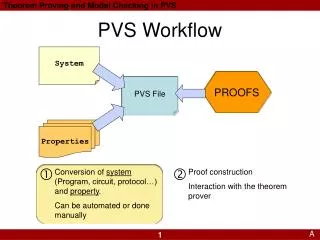
PVS Workflow System PROOFS PVS File Properties Conversion of system (Program, circuit, protocol…)and property. Can be automated or donemanually Proof construction Interaction with the theorem prover A
The Gentzen Sequent • COPY duplicates a formulaWhy? When you instantiate a quantified formula, the original one is lost • DELETE removes unnecessary formulae – keep your proof easy to follow
Propositional Rules • BDDSIMP simplify propositional structure using BDDs • CASE: case splittingusage: (CASE “i!1=5”) • FLATTEN: Flattens conjunctions, disjunctions, and implications • IFF: Convert a=b to a<=>b for a, b boolean • LIFT-IF move up case splits inside a formula
Quantifiers • INST: Instantiate Quantifiers • Do this if you have EXISTS in the consequent, or FORALL in the antecedent • Usage: (INST -10 “100+x”) • SKOLEM!: Introduce Skolem Constants • Do this if you have FORALL in the consequent (and do not want induction), or EXISTS in the antecedent • If the type of the variable matters, use SKOLEM-TYPEPRED
Equality • REPLACE: If you have an equality in the antecedent, you can use REPLACE • Example: (REPLACE -1){-1} l=r replace l by r • Example: (REPLACE -1 RL){-1} l=r replace r by l
Induction • INDUCT: Performs induction • Usage: (INDUCT “i”) • There should be a FORALL i: … equation in the consequent • You get two subgoals, one for the induction base and one for the step • PVS comes with many induction schemes. Look in the prelude for the full list