Media practical workshop camera
cool fun jgiugoip

Media practical workshop camera
E N D
Presentation Transcript
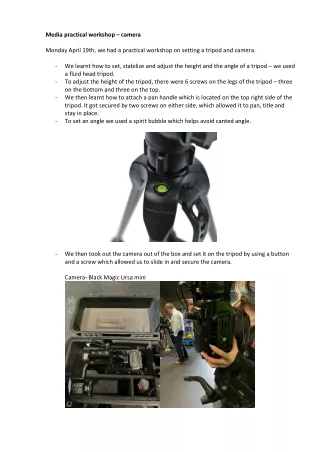
Media practical workshop – camera Monday April 19th, we had a practical workshop on setting a tripod and camera. - We learnt how to set, stabilize and adjust the height and the angle of a tripod – we used a fluid head tripod. - To adjust the height of the tripod, there were 6 screws on the legs of the tripod – three on the bottom and three on the top. - We then learnt how to attach a pan handle which is located on the top right side of the tripod. It got secured by two screws on either side, which allowed it to pan, title and stay in place. - To set an angle we used a spirit bubble which helps avoid canted angle. - We then took out the camera out of the box and set it on the tripod by using a button and a screw which allowed us to slide in and secure the camera. Camera- Black Magic Ursa mini
- We learnt how to fixate the camera on the tripod by sliding the ‘shoe’ of the camera into the top of the tripod while pushing the button on the left and then twisting the button which is located on the right side. We then were introduced to a V lock battery for the camera which allows us to turn it on and learnt how to attach it. - - We then were shown the zoom and focus rings which are located on the nose of the camera. (We first had to zoom in into a person’s eye, lip corner using the big ring, and then focus the lens of the camera by using the smaller ring to make the object sharp). After this, we learnt about exposure (blue button) – how to control the light and the brightness of the shot. We also learnt how to release the lens by using the silver button which is located near the focus ring. - -