Proper Configuration for Chauvet 50 Basic LED Control
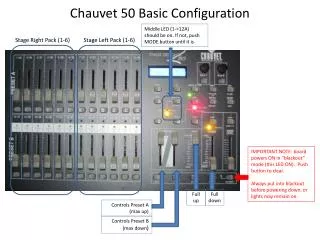
To ensure optimal operation of your Chauvet 50 Basic LED system, verify that the configuration settings for Middle LED (1->12A) are activated. If the LED is off, press the MODE button until it lights up. Important: The board powers ON in “blackout” mode, keeping the LED on. Always remember to push the button to clear this mode and return to blackout before powering down to prevent lights from remaining on. Use the Full Up and Full Down controls for precise adjustments to Preset A (max up) and Preset B (max down).

Proper Configuration for Chauvet 50 Basic LED Control
E N D
Presentation Transcript
Chauvet 50 Basic Configuration Middle LED (1->12A) should be on. If not, push MODE button until it is Stage Right Pack (1-6) Stage Left Pack (1-6) IMPORTANT NOTE: board powers ON in “blackout” mode (this LED ON). Push button to clear. Always put into blackout before powering down, or lights may remain on. Full up Full down Controls Preset A (max up) Controls Preset B (max down)