Understanding the Paperless Patient Chart: Benefits and Challenges in Nursing
200 likes | 331 Views
This article explores the concept of the paperless patient chart, also known as electronic medical records (EMR), highlighting its software options, hardware requirements, and impact on nursing workflows. It discusses the legal and ethical issues surrounding data security, patient privacy, and accessibility of records. The advantages of EMR include improved clinical decision-making and documentation efficiency, while disadvantages involve staff training challenges and financial implications. Ultimately, this resource aims to inform healthcare professionals about the significant transition to digital records in patient care.


Understanding the Paperless Patient Chart: Benefits and Challenges in Nursing
E N D
Presentation Transcript
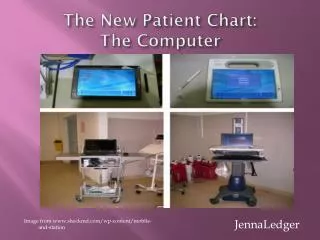
The New Patient Chart:The Computer Image from www.shockmd.com/wp-content/moblie-and-station JennaLedger
Objectives • Examine the paperless chart • Describe the software used in the paperless chart • Assess the effect of nurse’s work day • Assess the effect on patient care • Legal issues involving a paperless chart • Advantages and Disadvantages from a nursing perspective
What is the Paperless Chart? • Computers are the new patient chart • “COW “ or computer on wheels, PDAs, and laptops (Plas, 2007)
What can be found in the computer chart? • All patient information including: •Progress notes • Medications • Laboratory results • Radiology Images • Tests and Procedure • All orders (current and discontinued) • Surgical procedure reports •Assessments • Recommendations • Discharge Planning, etc.
Image from alexfatoryillustration.com Image from www.dil316.com/images/CD.jpg The Hardware The SOFTWARE
Hardware options •Computer on Wheels • Stationary PCs •Laptops •PDAs (Anderson, P, 2009)
Computer on Wheels Image from http://www.rubbermaidmedical.com/SOLUTIONS/CASESTUDIES/Documents/RubbermaidMedicalSolutions_NorwalkHospitalCaseStudy.pdf
Computer on Wheels • Laptop cart vs. PC cart • Patient Scanner • Storage areas • Work space • Sharps Container
SOFTWARE OPTIONS • There are many options for software here are some examples: • AdvancedMD EHR Software • Allscripts • eClinicalWorks • athenaClinicals • GE Healthare: Centrity • Eclipsys • gMed • Altos Solutions: OncoEMR • Pulse Patient Relationship Management • SequelMed EMR • SOAPware Clinical Suite
What is EMR Software? • Also known as electronic medical records (EMR) software •Information usually found in a patient’s EMR is progress note aka SOAP notes, problems, medications, vital signs, past health history, immunizations, laboratory results and radiology reports. •EMR can also be used to pull together a patient’s hospital bill •Benefits of using EMR compared to a Paper Chart: • data security • reduction in documentation expenses • shorter billing cycles • Improved clinical decision making • Better documentation
ECLIPSYS: ACUTE CARE EMR • AKA Sunrise Acute Care • Ranked #1 physician adoption satisfaction • Documentation available for Med/Surg, Telemetry, CCU, ICU, Labor and Delivery, Post-Partum, and Psych Patients
Information System Review • Type of system: Special Purpose • Health Care professionals use EMR • Functions • Data standards used in this system • Disease and Procedure Classification System
Advantages of EMR • Overcome problems and delay when transferring paper medical records • To improve problems with loss or misplacement of physical records • No time needed for handling and/or filing • Increases the security and confidentiality • More efficient and effective consultations • Notes are legible • Enhanced quality of care • Faster and more efficient diagnosis and treatments ( Spring, 2008)
Disadvantages of EMR • Staff training • Lack of national protocol • Lack of institution protocol • Fear of change and the unknown • Data Security • Financial difficulties to upgrade to the EMR • Example : buying the software, upgrading computers (Spring, 2008)
Ethical and Legal Issues • Privacy and co of EMR • Who should and could have access to patient records • Printing of data • Data Storage • Social networking Sites • Loss of computer • Use of proper waste of printed information • Example : HIPPA binds and shredding of files (Polack, 2008)
Informatics Competencies required by RN for EMR Computer Skills 1. Administration 2. Communication 3. Data Access 4. Documentation
Functions & Responsibilities of the Informatics Nurse • Open Communication with team members • Training on RN Staff • Re-functioning of program to increase documentation • Running pilot test before new functions go live
Conculsion • Whether we like it or not EMR are the new chart of the future
References Rubbermaid Medical Marketing Case Study Norwalk Hospital: Norwalk, CT. Retrieved October 4, 2010, from http://rubbermaidmedial.com/SOLUTIONS/ CASESTUDIES/Documents/RubbermaidMedicalSolutions_NorwalkHospital Casestudy.pdf Anderson,P. (August 4, 2009) The Leading Peer-Reviewed eHealth Journal . Journal of Medical Internet Research. Retrieved on October 4, 2010, from http:// www.ncbi.nim.nih.gov/pmc/artiles/PMC2762853. Polack, Peter. (2008). More about Legal Issues with Electronic Records. Retrieved on November 20, 2010 from http://www.buzzle.com/articles/more-about-legal-issues-with-electronic-records.html. Spring, Manda. (December 16, 2008) EMR Advantages and Disadvantages. Retrieved on November 17, 2010, from https://www.brighthub.com/health/technology/articles/7502.aspx. Staggers, Nancy. (2002). Results of a Delphi Study to Determine Informatics Competencies for Nurses at Four Levels of Practice. Retrieved on November 19, 2010 from https://nursing. Utah.edu/informatics/competencies.htm