CUAHSI WaterOneFlow Web Services
540 likes | 687 Views
CUAHSI WaterOneFlow Web Services. By Tim Whiteaker CE 394K.2 Hydrology 1 February 2007. Outline. What are Web Services What is WaterOneFlow What is WaterML How do we use HIS Analyst to access WaterOneFlow. 16. 4. Math library. Program. Programs Use Functions.


CUAHSI WaterOneFlow Web Services
E N D
Presentation Transcript
CUAHSI WaterOneFlowWeb Services By Tim Whiteaker CE 394K.2 Hydrology 1 February 2007
Outline • What are Web Services • What is WaterOneFlow • What is WaterML • How do we use HIS Analyst to access WaterOneFlow
16 4 Math library Program Programs Use Functions • Functions are pieces of code that perform a specific task What’s the square root of 16? result = Math.SquareRoot(16) Functions: Add Multiply SquareRoot
Functions: What’s the square root of 16 Add Multiply SquareRoot The answer is 4 Math library Service Program Web Services Let Computers Share Functions • Localprograms take advantage of remote resources • Works just like local function result = Service.SquareRoot(16) Client
How Do Web Services Work • SOAP (Simple Object Access Protocol) is a protocol for exchanging messages over a network • WSDL (Web Services Description Language) is a language for describing what a web service can do
How Do Web Services Work Server SOAP WSDL (This is what I can do) Client SOAP is like speaking the same languageWSDL is like a contract
CUAHSI Web Services (WaterOneFLow) • Standard mechanism for flow of hydrologic data between hydrologic data servers (databases) and users. • Provides data access to • USGS NWIS • EPA STORET • NCEP North American Model (NAM) • NASA MODIS • Daymet • NWS ASOS http://water.sdsc.edu/waterOneFlow/
NWISWeb site output # agency_cd Agency Code # site_no USGS station number # dv_dt date of daily mean streamflow # dv_va daily mean streamflow value, in cubic-feet per-second # dv_cd daily mean streamflow value qualification code # # Sites in this file include: # USGS 02087500 NEUSE RIVER NEAR CLAYTON, NC # agency_cd site_no dv_dt dv_va dv_cd USGS 02087500 2003-09-01 1190 USGS 02087500 2003-09-02 649 USGS 02087500 2003-09-03 525 USGS 02087500 2003-09-04 486 USGS 02087500 2003-09-05 733 USGS 02087500 2003-09-06 585 USGS 02087500 2003-09-07 485 USGS 02087500 2003-09-08 463 USGS 02087500 2003-09-09 673 USGS 02087500 2003-09-10 517 USGS 02087500 2003-09-11 454 Time series of streamflow at a gaging station
Observation Stations Map for the US Ameriflux Towers (NASA & DOE) NOAA Automated Surface Observing System USGS National Water Information System NOAA Climate Reference Network
Consistent Query Format Consistent Data Format WaterOneFlow
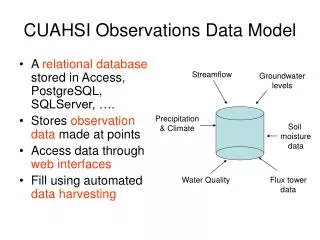
WaterOneFlow Methods • (Almost) the same for all networks • Methods • GetSiteInfo – Give me info about a site • GetVariableInfo – Give me info about a variable • GetValues – Give me a time series for a variable at a site
Input Network name and site code Authorization token Output Site name Site location Variables measured at the site Variable code Period of record GetSiteInfo where response = service.GetSiteInfo("NWIS:08158000", "")
Input Network name and variable code Authorization token Output Variable name Variable description Variable units what GetVariableInfo response = service.GetVariableInfo("NWIS:00060", "")
Input Network name and location (e.g., site code) Network name and variable code Start datetime End datetime Authorization token Output Site info Variable info Time series what GetValues where response = service.GetValues("NWIS:08158000", "NWIS:00060", _ "2006-12-31T01:00:00", "2006-12-31T08:00:00", "") when
The “Where” in GetValues • Works for sites, or geographic locations • NetworkName:SiteCode • NWIS:08158000 • GEOM:POINT(LongitudeLatitude) • GEOM:POINT(-113 35) • GEOM:BOX(WLon SLat,ELon NLat) • GEOM:BOX(-108 45,-107 46)
Locations Variable Codes Date Ranges Extract – Transform – Load STORET Data GetSiteInfo GetVariableInfo GetValues Data NAM NWIS WaterML Data WaterOneFlow Web Service Data Repositories Client EXTRACT TRANSFORM LOAD
WaterML – The Output of WaterOneFlow • Standardized for all data sources • Formats • Object • XML (for programs that can’t handle objects) • Defined in XML
XML – A Primer • The Extensible Markup Language (XML) is a W3C-recommended general-purpose markup language that supports a wide variety of applications. – Wikipedia • XML represents data • XML is both human and machine readable <site> <name>Mansfield Dam</name> </site>
element start tag end tag XML Structure • Example – Let’s describe a streamflow site element name = “site” <site></site> OR <site> </site> OR <site />
child element element element text Elements can have Children <site> <name>Mansfield Dam</name> </site>
Elements can have Attributes <site> <name>Mansfield Dam</name> <siteCodenetwork=“NWIS”>08154510</siteCode> </site> attribute name attribute value
XML Nesting <site> <name>Mansfield Dam</name> <siteCodenetwork=“NWIS”>08154510</siteCode> <location> <latitude>30.39</latitude> <longitude>97.91</longitude> </location> </site>
WaterML • XML for describing water data • Defined at • WaterOneFlow returns data in WaterML format http://water.sdsc.edu/waterOneFlow/documentation/schema/
USGS Data Source WaterML Response Streamflow gages Network SiteInfoResponseType Neuse River near Clayton, NC Sites VariablesResponseType Discharge, stage (Daily or instantaneous) Variables TimeSeriesResponseType Values 206 cfs, 13 August 2006 {Value, Time, Qualifier} • A data source operates an observation network • A network is a set of observation sites • A site is a point location where one or more variables are measured • A variable is a property describing the flow or quality of water • A value is an observation of a variable at a particular time • A qualifier is a symbol that provides additional information about the value Point Observations Information Model http://www.cuahsi.org/his/webservices.html
Response Types SiteInfo Variables TimeSeries Key Elements site sourceInfo seriesCatalog variable timeSeries values queryInfo WaterML Key Elements GetSiteInfo GetVariableInfo GetValues
SiteInfoResponseType • Namespaces • queryInfo • site Network Sites Variables
queryInfo • Parameters sent to service • URLs called (if external resource)
userparameters query URL queryInfo – Another Example
site • siteInfo – info about the site • seriesCatalog – catalogs of variables measured
siteInfo • Name • Site Code • Location
geoLocation • geogLocation – geographic coordinates • LatLon point • LatLon box • localSiteXY – projected coorindates European Petroleum Survey Groupi.e., NAD 83, etc.
name web service location series (variables) original data source seriesCatalog
series • variable – what is measured • valueCount – how many measurements • variableTimeInterval – when is it measured
variable • variableCode – global identifier • variableName • units Sites Variables Values
variableTimeInterval • TimeIntervalType – date range • TimeSingleType – single measurement • TimePeriodRealTimeType – last n days
ISO Time • International Organization for Standardization • 1998-03-01T14:30:00 = March 1, 1998, at 2:30 in the afternoon
queryInfo name code location site seriesCatalog what how many variables when SiteInfo Response, Recap
VariablesResponseType • variable – same as in series element • Code, name, units Sites Variables Values
Additional variable Children • variableDescription • valueType (enumeration) • Field Observation • Sample • Model Simulation Result • Derived Value • generalCategory – e.g., “water quality” • sampleMedium – e.g., “water column” -- Many are optional
TimeSeriesResponseType • queryInfo • timeSeries • sourceInfo – “where” • variable – “what” • values Sites Variables Values
sourceInfo • SiteInfoType • Same as siteInfo element • code, name, location • DataSetInfoType • For data continuous in space • LatLonPointType • LatLonBoxType
variable • Same as previous variable element • code, name, units, etc.
values • Each time series value recorded in value element • Timestamp, plus metadata for the value, recorded in element’s attributes qualifier ISO Time value
value Metadata Examples • qualifiers • censorCode (lt, gt, nc) • qualityControlLevel (Raw, QC’d, etc.) • methodID • offset • offsetValue • offsetUnitsAbbreviation • offsetDescription • offsetUnitsCode
TimeSeries Response, Recap queryInfo location variable values
Conclusions about WaterML • Consistent Format • Includes lots of information • How do I use it? HIS Analyst
HIS Analyst • Desktop apps that use WaterOneFlow • Examples for various application environments • HydroObjects – for apps that aren’t web service enabled • Workbook available at: http://www.cuahsi.org/his/docs/HIS-workbook-20061130.pdf
HIS Workbook • Ingesting NWIS Data into Excel • Ingesting STORET Data into Excel • Ingesting Weather and Streamflow Data into ArcGIS • Plotting MODIS Data with Matlab • Ingesting NWIS Data using VB.Net • Ingesting NWIS Data Using Java