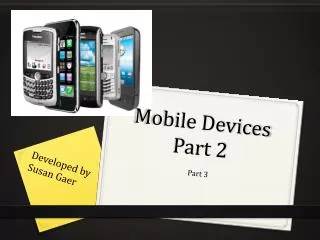
Mobile Devices Part 2
This training, developed by Susan Gaer, focuses on empowering learners to effectively utilize smartphones in educational settings. By the end of the session, participants will summarize various smartphone systems, download and install relevant apps, understand URL shorteners, and explore digital literacy's 4-5 Cs. Attendees will also discover classroom resources tailored for smartphone use. The session covers popular platforms such as Android, iPhone, Blackberry, and Windows and provides guidance on using tools like Google Play, App Store, and educational platforms like Socrative.

Mobile Devices Part 2
E N D
Presentation Transcript
Mobile Devices Part 2 Developed by Susan Gaer Part 3
Fun StartVOKI Need a Volunteer http://www.voki.com
ObjectivesBy the end of the training, you will be able to • Summarize the different types of smartphone systems and understand the pros and cons of each • Download and install apps • Comprehend URL Shorteners • Comprehend the 4-5 Cs for digital literacy • Locate apps appropriate for your phone and lesson • Locate resources for using Smartphones in the classroom
Smartphones Cons: No memory cards No high resolution screen No 4G Lack of Apps • Blackberry • Windows • Android • iPhone
Downloading Apps • Google Play • App Store • Blackberry App World • Windows Marketplace
URL Shorteners • Google URL Shortner http://goo.gl/ • Bitly https://bitly.com/ • Tinyurl http://tinyurl.com • Is.gd http://is.gd/
The Five C’s http://p21.org
Socrative Teacher: Log in by entering your email and password Student: Open a second computer/smartphone and go to m.socrative.com Student: Enter the Room Number. (The Room Number is reflected on the Teacher Dashboard) http://socrative.com
Phone as Modem http://junefabrics.com/iphone/index.php
Google Tools http:/voice.google.com http://docs.google.com http://blogspot.google.com
MoodleFor more resources, movies and moreJoin the OTAN Moodlehttp://adultedcourses.org/