Addressing Formatting Issues in Current and Next Environments
This document outlines the formatting discrepancies observed in both current and next environments, focusing on spacing, alignment, and visual inconsistencies. Key concerns include insufficient space between main headings and subheadings, misalignment of tables and text boxes, and improper display of images. The document also highlights issues with the visibility of tooltips and the background color of titles. A consistent format across all wiki editors and components is essential for a better user experience and readability.

Addressing Formatting Issues in Current and Next Environments
E N D
Presentation Transcript
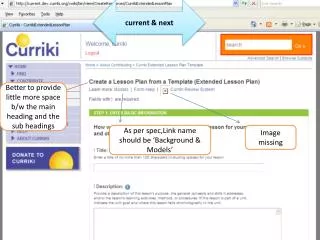
current & next Better to provide little more space b/w the main heading and the sub headings As per spec,Link name should be ‘Background & Models’ Image missing
current & next The wiki editor and the table length is not matching the other text box length.( All the wiki editors, textboxes, tables should have the same length.
IE 6 –current & next The space b/w the heading and the drop down seems very less. Since the iball is having a background shading, it seems the iball image is shown pulled down.
View mode >current & next Headings are not in bold. Also * shown at the beginning and end.
Windows XP:IE 7,FF3 –Next & current Back ground color of the title(green color) slightly exceeds the table
Windows XP:IE 7,FF3 –Next ‘Titles’ are not displayed in the same level(Title “Student will know” is slightly displayed upwards
Windows XP, MAC FF3 Current&dev (only in FF3) Tool Tip displays no border
Windows XP:IE 7,FF3,IE6,MAC Safari,FF3 only in next No Grid is displayed Background Colour is displayed incorrectly (Only in Next)