Download
1 / 4
40 likes | 139 Views
Learn how to adjust your Waste Paper Basket with step-by-step instructions for sliding, tilting, and securing the bin in place. Ensure proper positioning for a well-functioning bin.

E N D
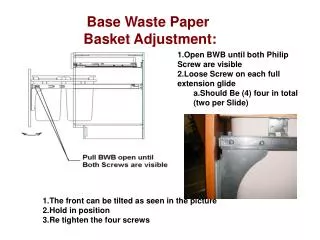
Base Waste Paper Basket Adjustment: • Open BWB until both Philip Screw are visible • Loose Screw on each full extension glide • Should Be (4) four in total (two per Slide) • The front can be tilted as seen in the picture • Hold in position • Re tighten the four screws
Adjusting the BWB Door from Left to Right Open BWB Door Loose the four screws that attach the metal glide to the door. • Tighten the four screws • Close door to look at position of door.
Adjusting the BWB Door Up and Down • Open BWB Door • Loose the four screws that attach the metal glide to the metal support. • Be careful, the door can easily fall off the track. • Tighten the four screws • Close door to look at position of door.
Adjusting for a BWB Door that opens automatically Push the black clip in on the full Extension Glide. (It will be where the two halves meet. • Open the door to the full extension point • The Clip on the left is the one that needs adjusted. • Note the Location of the Clip in the back of the cabinet • Move the Clip 1/8” to the Right • Tight Clip in Place • Re-assemble the Waste • Paper Basket Assembly in the Glide