Adjusting Cumulative Grading for P2 and P3 Terms in Gradebook
20 likes | 139 Views
This guide outlines the steps to change cumulative grading settings for the P2 and P3 terms within the gradebook. By following these instructions, teachers can ensure that report cards reflect the cumulative grades for each grading period. The final grade for S1 is already set to cumulative by default. Teachers need to open the gradebook, select their class, and adjust the display method to use cumulative grading for both P2 and P3. Repeat these steps for all classes to ensure consistency across the report cards.


Adjusting Cumulative Grading for P2 and P3 Terms in Gradebook
E N D
Presentation Transcript
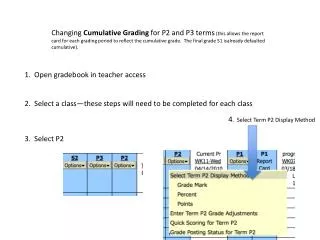
Changing Cumulative Grading for P2 and P3 terms (this allows the report card for each grading period to reflect the cumulative grade. The final grade S1 isalready defaulted cumulative). • 1. Open gradebook in teacher access • 2. Select a class—these steps will need to be completed for each class • 4. Select Term P2 Display Method • 3. Select P2
5. Click Use Cumulative Grading for this term…….. Repeat these steps for P3. Repeat all these steps for all classes.