Download
1 / 1
10 likes | 145 Views
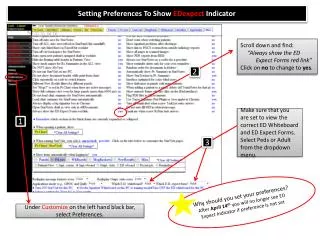
To ensure you can view the ED Expect Indicator after April 14th, follow these steps: 1. Navigate to "Setting" and select "Preferences". Scroll down and locate "Always show the ED Expect Forms red link". Click on 'No' to change it to 'Yes'. 2. Confirm you are viewing the correct ED Whiteboard and ED Expect Forms by selecting either Peds or Adult from the dropdown menu. Remember, if your preference is not set, the ED Expect Indicator will be hidden after April 14th. Customize your settings under Preferences for a better experience.

E N D
Setting Preferences To Show EDexpect Indicator Scroll down and find: “Always show the ED Expect Forms red link” Click on no to change to yes. 2 Make sure that you are set to view the correct ED Whiteboard and ED Expect Forms. Select Peds or Adult from the dropdown menu. 1 3 Why should you set your preferences?After April 14thyou will no longer see ED Expect Indicator if preference is not set Under Customize on the left hand black bar, select Preferences.