Understanding Cache Memory: Enhancing CPU Efficiency in Computer Systems
Cache memory is a crucial component in modern computer systems, sitting between the CPU and main memory. It significantly reduces the access time for frequently used data by holding the most needed information. With access speeds up to 10 times faster than main memory, cache memory minimizes CPU idle time and improves processing efficiency. This article discusses the structure, design parameters, mapping techniques, and replacement algorithms associated with cache memory, alongside its critical role in augmenting system performance.

Understanding Cache Memory: Enhancing CPU Efficiency in Computer Systems
E N D
Presentation Transcript
3. System Bus 3.1. Computer Components : CPU Memory ... 0 IR MAR Instruction 1 Instruction 2 MBR PC Instruction I/O AR ... I/O BR Data I/O Module Data Data n Buffers
Weaknesses of Main Memory technology • The access time is relatively (very) slow compared to CPU access time • CPU has to wait for so many cycles before the information from memory (READ) could arrive in CPU (CPU generally 40 to 50 times faster than main memory)
Why Cache? • Small “chunk” of memory with “very fast” cycle time (possibly 8-10 times faster than main memory cycle time) • Holds “the most needed” information (by the CPU) • It is expected that, more than 80% of CPU access will go to cache, instead of main memory • Overall access time from memory will be faster
Processor-Memory connection: The Cache Memory Main Memory (0.5-4GB) Control Unit IR R1 PC Cache Memory (256-2048 KB) MAR MBR R2 5-10 nanosecond cycle time R3 ALU1 ALU2 Faster access to/from cache memory, reduces CPU wait time. Smaller Cache size, lead to problems ADDER ALU3 40-60 nanosecond cycle time BUS
Cache Memory: What are going to talk about ? • We are not discussing the technology • But we are going the discuss about the reason behind cache implementation : minimizing the CPU idle time • Also, we are going to discuss about cache : mapping algorithms replacement algorithms
Hierarchy List From fastest to slowest access time : • Registers • L1 Cache • L2 Cache • Main memory • Disk cache • Disk • Optical • Tape
Locality of Reference principles Program execution behavior : • During the course of the execution of a program, memory references tend to cluster • What is a program : “a set instructions to command the computer to work, to perform something” loopMOV R1,A ADD R2,R1 ….. ADD A,R5 DEC R3 BNZ loop ……
Cache • Small amount of fast memory • Sits between normal main memory and CPU • May be located on CPU chip or module • To store temporarily, the most wanted program/instruction to be executed (by the CPU) Loop MOV R1,A ADD R2,R1 ………. DEC R3 MPY A,R3 BNZ loop ……
So you want fast? • It is possible to build a computer which uses only static RAM (see later) • This would be very fast • This would need no cache • This would cost a very large amount
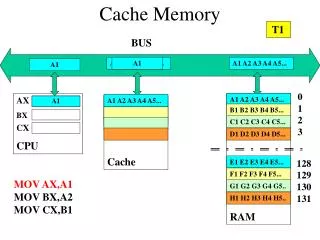
Cache operation - overview • CPU requests contents of a memory location • Check cache memory for this data • If present, get from cache (fast) • If not present, read required block from main memory to cache • Then deliver from cache to CPU • Cache includes tags to identify which block of main memory is in each cache slot
Cache Design parameters • Size, how big is the size (cost and effectiveness) • Mapping Function (how do we place data in cache) • Replacement Algorithm (how do we replace data in cache by new data) • Write Policy (how do we update data in cache) • Block Size (reflects the access unit of data in cache) • Number of Caches (how many level oc caches we need : L2 or L3?)
Size does matter • Cost • More cache is expensive (since cache memory is made of static RAM) • Speed • More cache is faster (up to a point) • Checking cache for data takes time (correlated to mapping function)
Cache Mapping • Direct • Associative • Set Associative
Main Memory 0 m 2m 3m 4m 5m 6m Block (K words) Line Number Tag 0 1 2 (C-1) Cache Block Length ( K words) Cache Mapping : Direct
Direct Mapping Cache Line Table • Cache line Main Memory blocks held • 0 0, m, 2m, 3m…2s-m • 1 1,m+1, 2m+1…2s-m+1 • m-1 m-1, 2m-1, 3m-1…2s-1
Direct Mapping Pros & Cons • Simple • Inexpensive • Fixed location for given block • If a program accesses 2 blocks that map to the same line repeatedly, cache misses are very high
Associative Mapping • A main memory block can load into any line of cache • Cache searching gets expensive
Cache Mapping : Fully Associative
Set Associative Mapping • Cache is divided into a number of sets • Each set contains a number of lines • A given block maps to any line in a given set • e.g. Block B can be in any line of set i • e.g. 2 lines per set • 2 way associative mapping • A given block can be in one of 2 lines in only one set
Cache Mapping : Set Associative (2 way)
Replacement Algorithms (2)Associative & Set Associative • Hardware implemented algorithm (speed) • Least Recently used (LRU) • e.g. in 2 way set associative • Which of the 2 block is lru? • First in first out (FIFO) • replace block that has been in cache longest • Least frequently used • replace block which has had fewest hits • Random
Write Policy • Write through • Write back
Write through • All writes go to main memory as well as cache • Multiple CPUs can monitor main memory traffic to keep local (to CPU) cache up to date • Lots of traffic • Slows down writes • Remember bogus write through caches!
Write back • Updates initially made in cache only • Update bit for cache slot is set when update occurs • If block is to be replaced, write to main memory only if update bit is set • N.B. 15% of memory references are writes
Replacement Algorithms • FIFO : First In First Out • LIFO : Last In First Out 3. LRU : Least Recently Used