1 / 6

History Data Rendering for Selected Mount Point in Disk Details

This section displays historical data based on the selected mount point. The mount point rendered at launch is determined by user interaction with the summary JSON or relevant disk details. Users can view transaction examples and gather insights into disk history, providing a comprehensive understanding of the disk's performance over time. This feature facilitates easy analysis and monitoring of disk activity for informed decision-making.

oberon
Download Presentation

History Data Rendering for Selected Mount Point in Disk Details

An Image/Link below is provided (as is) to download presentation Download Policy: Content on the Website is provided to you AS IS for your information and personal use and may not be sold / licensed / shared on other websites without getting consent from its author. Content is provided to you AS IS for your information and personal use only. Download presentation by click this link. While downloading, if for some reason you are not able to download a presentation, the publisher may have deleted the file from their server. During download, if you can't get a presentation, the file might be deleted by the publisher.

E N D

Presentation Transcript


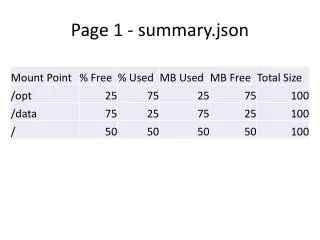
  1. Page 1 - summary.json

  2. Page 2 Based on the mount point selected it will render history data for that mount point. The mount selected at launch is determine by what was clicked on summary.json

  3. disk_details.json

  4. disk_history.json

  5. Transaction Example

  6. Transaction Example

More Related