Understanding Camera Analogies and Transformations in 3D Modeling
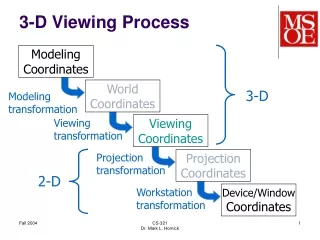
This chapter provides a comprehensive overview of the various types of transformations used in 3D modeling and viewing. It explains core concepts such as viewing and modeling transformation, projection transformation, and viewport transformation. Key techniques like glTranslatef(), glRotatef(), and gluLookAt() are discussed for controlling 3D space positioning and clipping unwanted model portions. The chapter emphasizes the significance of perspective and orthographic projections, enabling users to view geometric models in any orientation and effectively manipulate their representations in the virtual environment.

Understanding Camera Analogies and Transformations in 3D Modeling
E N D
Presentation Transcript
Contents • Overview: The Camera Analogy • Viewing and Modeling Transformation • Projection Transformation • Viewport Transformation
Chapter Objectives • View a geometric model in any orientation • Control the location in 3D space • Clip Undesired portions of the model
Overview: The Camera Analogy • Viewing Transformation • Positioning the view volume in the world • Modeling Transformation • Positioning models in the world • Projection Transformation • Determining the shape of the view volume • Viewport Transformation
Method for Transformation - 1 • The Viewing Transformation • glTranslatef(); • glRotatef(); • gluLookAt(); • The Modeling Transformation • glTranslatef(); • glRotatef(); • glScalef();
Method for Transformation - 2 • The Projection Transformation • Perspective • Orthographic • Order of Setting • glMatrixMode(types) • glLoadIdentity() • glFrustum() or gluPerspective(), glOrtho()
General-Purpose Transformation Commands • glMatrixMode(GLenum mode) • Specifies which matrix will be modified • GL_MODELVIEW, GL_PROJECTION, GL_TEXTURE • glLoadIdentity() • Sets the currently modifiable matrix to the 4*4 identity matrix
General-Purpose Transformation Commands • glMultMatrix{fd}(const Type *m) • Multiply the current matrix by the matrix passed in as an argument • glLoadMatrix{fd}(const Type *m) • Set the 16 values of the current matrix to those specified by m
Thinking about Transformation • To performing viewing or modeling transformation • glMatrixMode(GL_MODELVIEW);
2 Types of Coordinate System • Example glMatrixMode(GL_MODELVIEW); glloadIdentity(); glMultiMatrixf(N); glMultiMatrixf(M); glBegin(GL_POINTS); glVertex3f(v); glEnd(); • Grand, Fixed Coordinate System • Moving a Local Coordinate System
Modeling Transformation • Translate • Void glTranslate{fd}(x, y, z); • Rotate • Void glRotate{fd}(angle, x, y, z); • Scale • Void glScale{fd}(x, y, z); • glScalef(2.0, -1.5, 1.0);
Viewing Transformation - 1 • glTranslate() or glRotate() • Moving forward camera = Moving Backward Object • gluLookAt() Void gluLookAt( eyex, eyey, eyez, centerx, centery, centerz, upx, upy, upz);
Viewing Transformation - 2 • Creating a Custom Utility Routine Void PilotView(GLdouble planex, Gldouble planey, Gldouble planez, Gldouble roll, Gldouble pitch, Gldouble heading) { glRotated(roll, 0.0, 0.0, 1.0); glRotated(pitch, 0.0, 1.0, 0.0); glRotated(heading, 1.0, 0.0, 0.0); glTranslated(-planex, -planey, -planez); }
Projection Transformations • Purpose • To define a viewing volume • How an object is projected onto the screen • How to Clip the object • Setting for projection transformation • glMatrixMode(GL_PROJECTION); • glLoadIdentity();
Perspective Projection - 1 • Foreshortening • The farther, the smaller object appears in the final image • glFrustum(left, right, bottm, top, near, far)
Perspective Projection - 2 • gluPerspective(fov, aspect, near, far)
Orthographic Projection -1 • View Volume • Rectangular parallelepiped
Orthographic Projection -2 • glOrtho(left, right, bottom, top, near, far) • glOrtho2D (left, right, bottom, top)
Defining the Viewport • glViewport(x, y, width, height) gluPerspective(fov, 2.0, near, far); glViewport(0, 0, 400, 200); • The Transformed Depth coordinates
Program Demo • Transformation\lesson1.exe