Motion Detecting Workstation
130 likes | 283 Views
Motion Detecting Workstation. Theodore Shinners Kevin Schmitz University of Iowa: Embedded Systems Spring 2011. Hardware Overview. Four Motion Control Sensors Three Solid State Relays spliced in extension cords. Zilog ZMOTION Detectors. Zilog ZMOTION Detectors Cont. Pins 1,8 are GND


Motion Detecting Workstation
E N D
Presentation Transcript
Motion Detecting Workstation Theodore Shinners Kevin Schmitz University of Iowa: Embedded Systems Spring 2011
Hardware Overview • Four Motion Control Sensors • Three Solid State Relays spliced in extension cords
Zilog ZMOTION Detectors Cont • Pins 1,8 are GND • Pins 2,7 are Vcc: Device Uses 3.3V. • Required a simple step down from the 5V output • Used a Sharp voltage regulator • Pin 6 is not used, set to Vcc • Pin 5 is the output, pulled low with motion • Pin 4 is analog input for sensitivity, set to 1.4 V for medium sensitivity • Pin 3 is analog input delay, set to .2V for a 5 sec signal
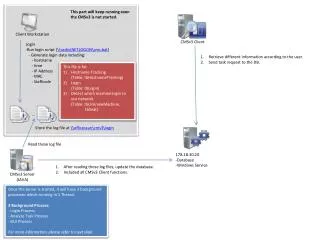
SSR Continued • SSR has 5V control and 5A 240 VAC/VDC load • Standard 3 wire extension cords were cut apart • Relay was soldered on the live wire • Output from circuit above wired to control • When the MCU output pin for associated relay goes high whatever is plugged into the extension cord is turned on
Software Overview • Four motion sensors inputs to MCU • All pulled up, when one goes low: • Determine what sensor was tripped • Look for any patterns • Determine the current output state of associated relay output • Change the output accordingly • Constant Sampling for motion, delays once found
Software Example • pin = PINC; pin = pin & 0b00001111; //read in inputs if(pin != 0b00001111){ //if a sensor is low //Sensor 1 if(pin == 0b00001110){ //if it is the first sensor _delay_ms(2000); //wait and look for the pin = PINC; //”all on” condition pin = pin & 0b00001111; if(pin == 0b00000000){ temp2 = 0b00111000; //three output pins will be on }
Software Example Cont. • else{ temp = out & 0b00001000; //otherwise only deal with the 1st relay if(temp == 0b00001000){ temp2 = out & 0b00110000; //if on turn off } if(temp == 0b00000000){ temp2 = out | 0b00001000; //if off turn on } } out = temp2; //send the output PORTB = out; _delay_ms(5700); //wait for delay to run out } //end sensor 1
Motion Description • 4 Motion Detectors Placed Horizontally across a board with line of sight focused with a physical shield • Detectors 1-3 individually control output hardware • 4th detector controls output hardware components 2 and 3 • 1st motion is to simply wave your hand over a sensor • One pass over the sensor will turn the component on • The next will turn it off
Possible Motions • 2nd motion is to wave your hand from left to right across all 4 sensors. • This will turn on all 3 output hardware components • 3rd motion is to wave your hand in the opposite direction across all 4 sensors. • This will turn those same components off
Real World Applications • Reduction of Power Consumption • Lighting Control • Limited Mobility Assistance • Personal Use, plug in anything • User Interfacing, motion control on desktop PCs, etc
Possible Improvements • Program More Motion Patterns • ie (3,2,1,4 makes all devices blink on and off) • Improve Software to avoid problems with long delays from motion controls • Additional output hardware • Workstation can control anything powered by an outlet