SlideServe
Menu
Preferences
© SlideServe · v2026

Microsoft Excel 2007

korene avatar
17 slides · 480 Views · 200 likes · Aug 27, 2014

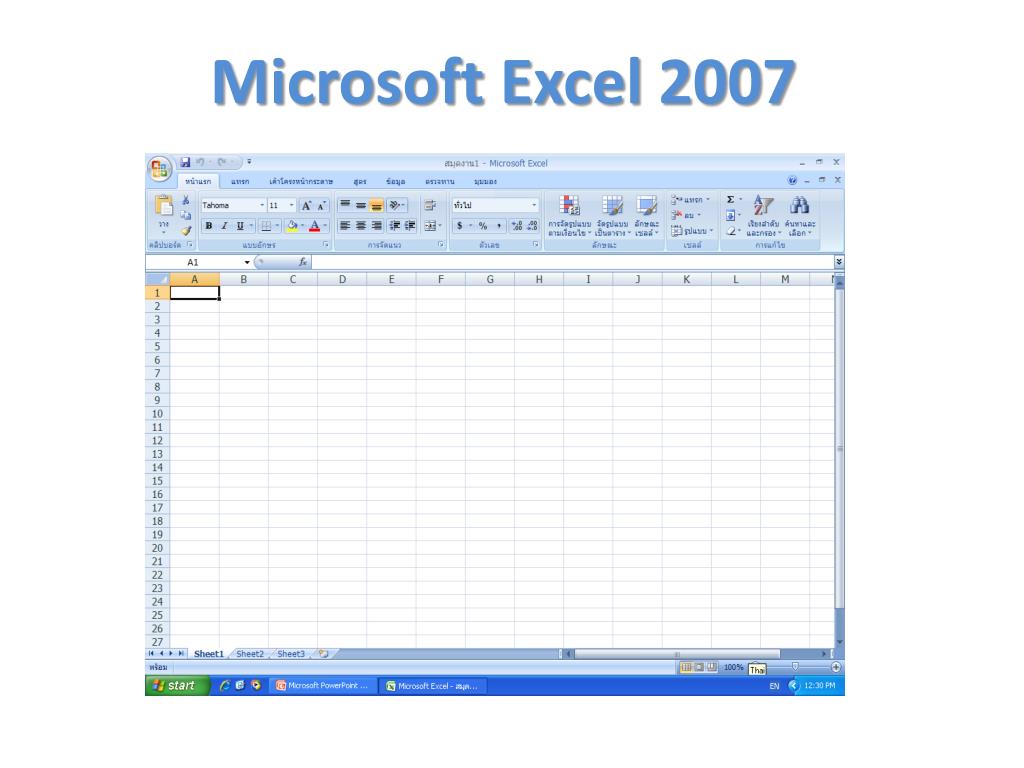
Microsoft Excel 2007. 1. 3. 2. 5. 4. 6. 7. 10. 8. 12. 9. 11. 13. 14. ปุ่ม Microsoft office. เป็นที่รวมคำสั่งที่ใช้จัดการไฟล์ทั่วไป เช่น New,Open,Save,Print. Quick Access Toolbar. เป็นที่รวมคำสั่งที่ใช้งานบ่อย ๆ. Ribbon.
Microsoft Excel 2007 - slide 1
01 / 17Microsoft Excel 2007
1 / 17

Download Presentation

Microsoft Excel 2007
An Image/Link below is provided (as is) to download presentation

Download Policy: Content on the Website is provided to you AS IS for your information and personal use and may not be sold / licensed / shared on other websites without getting consent from its author.Content is provided to you AS IS for your information and personal use only. Download presentation by click this link. While downloading, if for some reason you are not able to download a presentation, the publisher may have deleted the file from their server.During download, if you can't get a presentation, the file might be deleted by the publisher.

E N D

More Related Content

Presentation Transcript
  1. Microsoft Excel 2007

  2. 1 3 2 5 4 6 7 10 8 12 9 11 13 14

  3. ปุ่ม Microsoft office เป็นที่รวมคำสั่งที่ใช้จัดการไฟล์ทั่วไป เช่น New,Open,Save,Print

  4. Quick Access Toolbar เป็นที่รวมคำสั่งที่ใช้งานบ่อย ๆ

  5. Ribbon แท็บของกลุ่มคำสั่งที่แบ่งออกเป็นหมวดหมู่ ซึ่งถูกออกแบบมาให้แทนที่Menu และ Toolbar เดิมเพื่อให้สามารถค้นหาคำสั่งได้อย่างรวดเร็ว

  6. Title Bar แสดงชื่อ Workbook ที่ใช้งานอยู่

  7. Contextual แท็บพิเศษที่จะแสดงเมื่อเราใส่ออบเจ็คลงใน Worksheet

  8. Formula Bar: สำหรับจัดการสูตรหรือ จัดการข้อมูลภายในเซลที่เลือก

  9. Column ช่องข้อมูลที่อยู่ในแนวตั้ง มีจำนวน16,384 คอลัมน์ หรือเริ่มต้นจาก A ถึง XFD

  10. Row ช่องข้อมูลที่อยู่ในแนวนอน มีจำนวน 1,048,576 แถว

  11. Sheet Tab แสดงชื่อของ Worksheet

  12. Name Box แสดงชื่อเซลที่เลือก และสามารถตั้งชื่อเซลที่เลือกได้ รวมถึงสามารถใช้เพื่อเลื่อนไปยังเซลที่กำหนดได้

  13. Status Bar แสดงสถานะต่าง ๆ ของโปรแกรม

  14. Worksheet แผ่นงานที่ใช้บันทึกข้อมูล มีลักษณะเป็นตาราง แต่ละตารางเรียกว่าเซลโดยเราสามารถเพิ่มจำนวน Worksheet ได้

  15. View Shortcuts มุมมองของเอกสาร

  16. Zoom และ Zoom Slider เครื่องมือที่ใช้สำหรับย่อหรือขยายหน้าจอ

  17. Mouse Pointer Normal Pointer Normal Pointer in Worksheet I-Beam Pointer Row Width Adjuster , Column Width Adjuster