Mastering IT Skills: HTML, Scratch Programming, and Photo Editing in CSE 2013
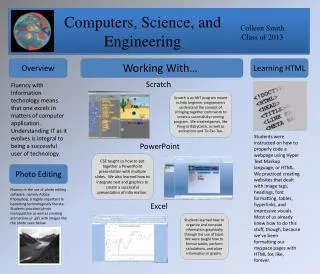
In the Class of 2013, we explored essential IT skills, focusing on HTML, Scratch programming, and photo editing. Our journey began with Scratch, an MIT platform that helped us grasp programming concepts through game creation like Pong and Tic-Tac-Toe. We learned to code websites using HTML, mastering tags, headings, and visual elements. Additionally, we developed PowerPoint presentations, emphasizing text and graphics integration. Lastly, we practiced photo editing with Adobe Photoshop, manipulating images and creating animations. These experiences laid a solid foundation for technology fluency.

Mastering IT Skills: HTML, Scratch Programming, and Photo Editing in CSE 2013
E N D
Presentation Transcript
Computers, Science, and Engineering Colleen Smith Class of 2013 Overview Learning HTML Working With… Scratch Fluency with Information technology means that one excels in matters of computer application. Understanding IT as it evolves is integral to being a successful user of technology. Scratch is an MIT program meant to help beginner programmers understand the concept of stringing together commands to create a successfully-running program. We created games, like Pong or BabyCatch, as well as animations and Tic-Tac-Toe. Students were instructed on how to properly code a webpage using Hyper Text Markup language, or HTML. We practiced creating websites that dealt with image tags, headings, font formatting, tables, hyperlinks, and impressive visuals. Most of us already knew how to do this stuff, though, because we’ve been formatting our myspace pages with HTML for, like, forever. PowerPoint CSE taught us how to put together a PowerPoint presentation with multiple slides. We also learned how to integrate text and graphics to create a successful presentation of information. Photo Editing Fluency in the use of photo editing software, namely Adobe Photoshop, is highly important in becoming technologically literate. Students practiced photo manipulation as well as creating animations or .gifs with images like the photo seen below. Excel Students learned how to organize and compute information graphically through the use of Excel. We were taught how to format tables, perform calculations, and place information in graphs.