Network Configuration Overview for A3 Printer and Devices
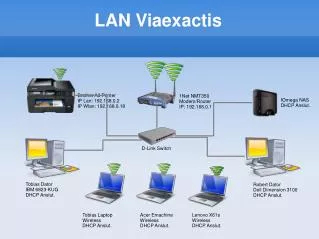
This document outlines the IP configuration of various network devices connected to the LAN. It includes settings for the Brother A3 printer, which can be accessed via IP 192.168.0.2 and via WLAN at 192.168.0.18. The modem/router is a 1Net NMT350 with an IP of 192.168.0.1. Additionally, several computers and laptops, including an IBM 6823-KUG, Dell Dimension 3100, and various Acer and Lenovo devices, are configured to connect through DHCP to the network. This setup ensures seamless connectivity across all devices.

Network Configuration Overview for A3 Printer and Devices
E N D
Presentation Transcript
LAN Viaexactis Brother A3 Printer IP Lan: 192.168.0.2 IP Wlan: 192.168.0.18 1Net NMT350 Modem/Router IP: 192.168.0.1 IOmega NAS DHCP Anslut. D-Link Switch Tobias Dator IBM 6823-KUG DHCP Anslut. Robert Dator Dell Dimension 3100 DHCP Anslut. Tobias Laptop Wireless DHCP Anslut. Acer Emachine Wireless DHCP Anslut. Lenovo X61s Wireless DHCP Anslut.