
Uploaded by
agatha
5 SLIDES
193 VIEWS
60LIKES
Configuring SmartRF Studio for NO TX and Single RX Mode with Hexadecimal Adjustments
DESCRIPTION
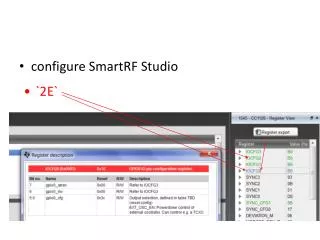
This guide provides instructions for configuring SmartRF Studio to operate in a specific setup where transmission (TX) is disabled and a single receiver (RX) is enabled. The focus is on adjusting the IOCFG0 setting to `2E` (Hexadecimal), correlating to binary `0010.1110`. This configuration is essential for optimizing communication parameters in RF applications, ensuring that the device correctly interprets signals without transmitting. Follow the steps to implement these settings effectively.
Download
1 / 5
Download Presentation 
Configuring SmartRF Studio for NO TX and Single RX Mode with Hexadecimal Adjustments
An Image/Link below is provided (as is) to download presentation
Download Policy: Content on the Website is provided to you AS IS for your information and personal use and may not be sold / licensed / shared on other websites without getting consent from its author.
Content is provided to you AS IS for your information and personal use only.
Download presentation by click this link.
While downloading, if for some reason you are not able to download a presentation, the publisher may have deleted the file from their server.
During download, if you can't get a presentation, the file might be deleted by the publisher.
E N D
Presentation Transcript
configure SmartRF Studio • `2E`
46 is 0010 1110 = 2E (Hex) So need change IOCFG0 to ``2E``








More Related