Download
1 / 20
200 likes | 541 Views
Microcomputer Architecture. Please fill out the 3x5 card. Name Prior math/stats/comp sc coursework Any computer expertise Planned post-grad plans Hopes/fears about this class! Something I should know about you or might find interesting (helps me remember)

E N D
Please fill out the 3x5 card • Name • Prior math/stats/comp sc coursework • Any computer expertise • Planned post-grad plans • Hopes/fears about this class! • Something I should know about you or might find interesting (helps me remember) • A Password (make it one you will remember, but not one you also use for anything important. This is for web page access)
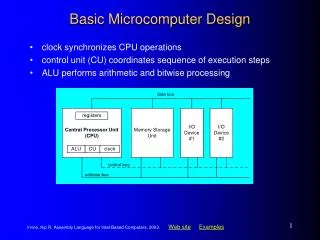
Computers - Basic Architecture • Computers have: • Input • Output • Storage (Memory) • Connectivity (can be seen as an IO channel)
Some simple binary arithmetic • Why Binary? • Why Decimal? • People count by 10s • Because we have ten fingers • Computers count by ones • Because magnetic storage media can electricity can be easily set to “on” and “off” • Or 0 and 1
Bits and Bytes • All of the data, programs, and circuitry are digital or binary in nature, meaning that they are comprised of the elements 0 and 1. • This is somewhat different than standard (not digital or HD) radio, television, and vinyl or LP records, which operate on analog methods. • Analog electronics means that devices use an electrical signal that has amplitude or magnitude instead of a stream of 0's and 1's. • Why binary? Because the storage of information on magnetic media is accomplished by arranging bits of metallic oxide in one of two alignments, corresponding to 0 or 1. • This allows for massive numbers of 0s and 1s to be stored in a very small space. This smallest unit of information (a 0 or a 1) is called a bit. • Collections of bits can be organized into larger chunks. • 4 bits = 1 nibble • 8 bits = 2 nibbles = 1 byte
ASCII Characters • A single byte, consisting of 8 bits can represent 256 different numbers • The largest number represented by n bits is 2n-1 • Hence 28-1 = 255 • Including 0, that makes 256 different numbers • These 256 numbers have been standardized to the ASCII character set. All PCs use the same number to represent the same character. • This will expand with Unicode
What Do Computers Do? • Computers add • Computers Subtract • Which is negative addition • Computers multiply • Which is adding multiple times • Computers Divide • Which is negative adding a bunch of times • Computers do more complicated things – • Square roots, power functions, exponentiation, logarithms • All by numeric approximation – which is addition • They move around the data that they add. • That’s all…
The CPU • Functions as the arithmetic unit of the computer • It operates according to it’s clock cycle • A 1.8 GHz computer has a clock that cycles 1.8 billion times per second
Binary addition • Adding Binary Numbers is Simple • 3 Rules • 0 + 0 = 0 • 1 + 0 = 1 • 1 + 1 = 10 ( = 0 and carry the 1 to the next higher column)
Does this look familiar • Binary Addition is the electrical/electronic application of the “exclusive or” from logic • Many numbers that are encountered frequently in computers arise from binary arithmetic
Get on the Bus • Computers read data on the “buses” that the CPU has • Two Buses of note • Data Bus • The data read into (or written from) the CPU or memory • Address Bus • The spot in memory to read from or write to
Digital Systems • So, in the end, we can see that computers simply move ad add 0’s and 1’s. • And out of this, we can build incredibly rich and complex experiences • Such as • Or…