Understanding File Management and Access in Operating Systems
This guide covers essential concepts in file management systems within operating systems, focusing on file descriptors, permissions, and system calls for file operations. It explains the basics of memory management, inter-process communication, and the structure of file attributes (read, write, execute). Practical examples demonstrate how to use system calls such as open, close, and lseek, alongside file handling functions from the standard C library. Additionally, common UNIX commands for managing file permissions, like chmod and umask, are discussed, providing a comprehensive overview suitable for both beginners and advanced users.

Understanding File Management and Access in Operating Systems
E N D
Presentation Transcript
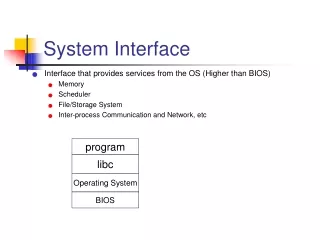
System Interface • Interface that provides services from the OS (Higher than BIOS) • Memory • Scheduler • File/Storage System • Inter-process Communication and Network, etc program libc Operating System BIOS
File System • A popular but also complex subsystem • File descriptors (pseudo files, like stdin and stdout) • Low level IO • File Management • Examples file pointer / usr bin home file EOF
A little about File Attributes • File attributes (srwxrwxrwx) • read, write and execute • an octal digit, rwx, desribes the permission to a set of users • Three sets of differents users, owner, group and others • Some unix commands: umask, chmod, etc to change the attributes
File Accesses • Read and Write • getc() and putc(); getchar() and putchar() • int read(int fd, char *buf, int n); • int write(int fd, char *buf, int n) #include <stdio.h> int getchar () { char c; return (read(0, &c, 1) == 1 ) ? c : EOF; } #include <stdio.h> int main () { char buf[1024]; int n; while ((n = read(0, buf, 1024)) > 0) write ( 1, buf, n); return 0; }
File Accesses -- continued • Open, creat, close and unlink • int open(char *name, int flags, int perms); • Persm can be O_RONLY, O_RDWR, O_WRONLY and others • int creat(char *name, int perms); /* within open, O_CREAT */ • int close(int fd); • int unlink(char *path); #include <fcntl.h> /* A copy program*/ int main () { char *f1 =“file1”, *f2=“file2”; int fd1, fd2, n; if (fd1 = open(f1, O_RDONLY, 0) == -1) usage(“uanble to opening source file %s\n”, f1); if (fd2 = creat(f2, 0666) == -1) usage(“unable to creating new file %s \n”, f2); while ((n = read(fd1, buf, 1024) > 0)) write ( fd2, buf, n); return 0; } #include <stdarg.h> #include <stdio.h> void usage(char *fmt, …) { va_list args; va_start(args, fmt); fprintf(stderr, “error: “); vfprintf(stderr, fmt, args); va_end(args); fprint(“usage: srcfile destfile\n”); }
File seek -- access with fix location • lseek/fseek • long lseek(int fd, long offset, itn origin); • Origin: 0, 1, 2, determines where to start offset. • 0: beginning; 1: current location; 2: the end. #include “stdio.h” /* A copy program*/ int main () { char *f1 =“file1”, *f2=“file2”; int fd1, fd2, n; if (fd1 = open(f1, O_RDONLY, 0) == -1) usage(“uanble to opening source file %s\n”, f1); if (fd2 = creat(f2, 0666) == -1) usage(“unable to creating new file %s \n”, f2); else lseek(fd2, 0L, 2); while ((n = read(fd1, buf, 1024) > 0) write ( fd2, buf, n); return 0; }
Recap on lab 4 • File access alternatives • File * fp = fopen(); • fgets() • Int fd = open(name, flags, perms); • read(fd, buff, n); #include <stdio.h> /* lab 4 */ int main () { char *maibox = argv[1]; int fd; File *fp; #if 1 fp = fopen(mailbox, “r”); #else fd = open (mailbox, O_RDONLY, 0); #endif for ( ) { /* keep reading every line and process the HEADER and BODIES */ } return 0; }