
Uploaded by
vevay
23 SLIDES
376 VIEWS
230LIKES
電信局來線
DESCRIPTION
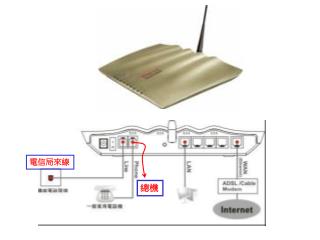
電信局來線. 總機. 2. 1. 按滑鼠右鍵選內容. 點選 TCP/IP. 點選. 選擇. 選擇. 按確定. 啟動 IE 瀏覽器. 按 Enter 鍵. 輸入 192.168.1.1. 不需輸入. 按確定. 撥接 PPPOE 設法. 選擇啟用. ISP 名稱. ADSL 連線帳號. ADSL 連線密碼. 輸入完畢按 OK. 固定 IP 設法-1. 固定 IP 設法-2. 輸入固定 IP. 輸入子網路遮罩. 輸入預設閘道. 完畢按 OK. Cable MODEM(DHCP) 設法. 選擇啟用. 選擇. 不須指定.
Download
1 / 23
Download Presentation 
電信局來線
An Image/Link below is provided (as is) to download presentation
Download Policy: Content on the Website is provided to you AS IS for your information and personal use and may not be sold / licensed / shared on other websites without getting consent from its author.
Content is provided to you AS IS for your information and personal use only.
Download presentation by click this link.
While downloading, if for some reason you are not able to download a presentation, the publisher may have deleted the file from their server.
During download, if you can't get a presentation, the file might be deleted by the publisher.
E N D
Presentation Transcript
電信局來線 總機
2 1
點選TCP/IP 點選
選擇 選擇 按確定
按Enter鍵 輸入192.168.1.1 不需輸入 按確定
撥接PPPOE設法 選擇啟用 ISP 名稱 ADSL 連線帳號 ADSL 連線密碼 輸入完畢按OK
固定IP設法-2 輸入固定IP 輸入子網路遮罩 輸入預設閘道 完畢按OK
Cable MODEM(DHCP) 設法 選擇啟用 選擇 不須指定
168.95.1.1 168.95.192.1 按ok
選該選項 按OK
IPBB設定不需更動 Sip server Ip address Ipbb 帳號 Ipbb密碼
選擇 AP基地台名稱
Internet 連線失敗 Ipbb 注冊失敗
More Related