Download
1 / 19
190 likes | 317 Views
This workshop outline from July 2007 provides an in-depth introduction to ArcServer, ESRI's flagship server GIS product. Attendees will learn about server GIS applications, sharing geocoded data, and how ArcServer enhances GIS capabilities for large user bases over networks. The outline covers key services like map caching, geocoding, and geospatial processing along with specific client interfaces for web, mobile, and desktop. Various demonstrations highlight practical applications and the benefits of centralizing data processing and management, ultimately facilitating improved service performance in GIS operations.

E N D
ArcServer Kris Lander Central Region HQ RFC GIS Workshop July 2007
Outline • What is Sever GIS and ArcServer? • ArcServer Services • Demos
Server GISAuthor => Publish => Serve • Server GIS allows GIS capabilities to be delivered to large numbers of users over networks. • Enterprise GIS users connect to central GIS servers using traditional desktop GIS as well as Web browsers, mobile computing devices, and digital appliances. • Advantages • Flexible applications • Scalable Architecture
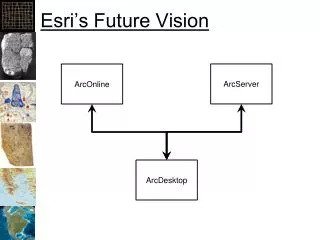
What is ArcServer? • ESRI's primary server GIS product. • Maps, Globes and Geocoded data can be shared as a “resource” by ArcServer • A server hosts the data, handles requests for data and allows users to connect to Resources on the server through a variety of client interfaces. • Users can consume services across multiple platforms and actually use the data instead of just “looking” at data
ArcServer Clients • Web • Firefox, IE or any “thin” client • Desktop • ArcGIS,ArcExplorer, Google Earth, GRASS GIS • Mobile • PDA, Smartphone, Laptop • Any device running Pocket PC or Windows CE
Two Development Worlds • .NET • Windows platform • .NET development environment • IIS Server • Java • Linux/Solaris/Windows platform • Java development environment • Apache Server
Services • Map – 2D Map • Globe – 3D Globe • Geocode – Address Matching Jobs • Geodatabase – Access to contents of DB. DB contents can be checked out, edited, and checked back in. • Geoprocessing – Remotely ask to the server to run a model or do geoprocessing • Network.
Map and Globe Service • 2D Clients • ArcGIS Desktop • ArcExplorer • Web API Interface • 3D Clients • Google Earth • ArcExplorer • 3D Client Specs • Data in Cube Projection • Cache on demand or pre-generated cache • Consumers can mix and match services
Geoprocessing Service • A Toolbox or tool layer can be published as a model • Allows organization to centralize data and processes (workflows) • Modelbuilder models are exposed to the client as tasks • Model and data reside on the server • Clients automatically understand the parameter inputs of the models • Supports very thin clients as the processing is handled on the server • Two Processing Modes: • Synchronous: User is locked out of the software while a task is running (ArcGIS Desktop). • Asynchronous: User maintains control of the application while task is running.
Geodata Service • Publish and share data to different locations • Geodatabase replication of http:\\ • Desktop Client (ArcGIS) can be used to extract data, synchronize and replicate
Other Services • Geocoding • Forward and Reverse supported • Network Analyst • Routing etc. • Think Pizza delivery optimization
Improving Service Performance • Map Caching • creates a pre rendered map so that server resources aren’t required to generate data. • 2D and 3D data can be cached. • Good for base maps, aerial photography and data that does not change frequently. • Simplify Mapping to reduce processing requirements • Tune the Service properties
Data Requirements • Map – mxd • Globe – 3dd • Geocode -- .loc file or geodatabase • Geodata – any geodatabase • Geoprocessing -- .tbx or mxd out of the box
Demo Disclaimer • Everything in this Demo was done within the past month • 1 week of ESRI Conference training • Only 40 hours of development time into these applications • No custom programming was required • Nothing is optimized • Most difficult part was setting up software
Demo 1:Web Mapping • Web-based interface • Query Tools • Geoprocessing Tools
Demo 2:Web Service “Mashup” Example • Incorporating Services from Multiple Sources • GIS-1 Server at CRH • Pennsylvania State Data Service • ESRI ArcGIS Online Map Services • Advantage of Fusing and Caching Base Maps
Demo 3:Flood Inundation Example • Free ArcGIS Online 1-m Imagery • Extracting Data to ArcGIS with Geodata Service • Distributed Geodatabase Tools in ArcGIS
Potential NWS Applications • Mobile: Storm damage path surveys or verification for flood inundation mapping • Situation Awareness Tool • Geoprocessing: NWS wide dambreak x-section template and geoprocessing. • GIS Portal and data library