Download
1 / 1
10 likes | 112 Views
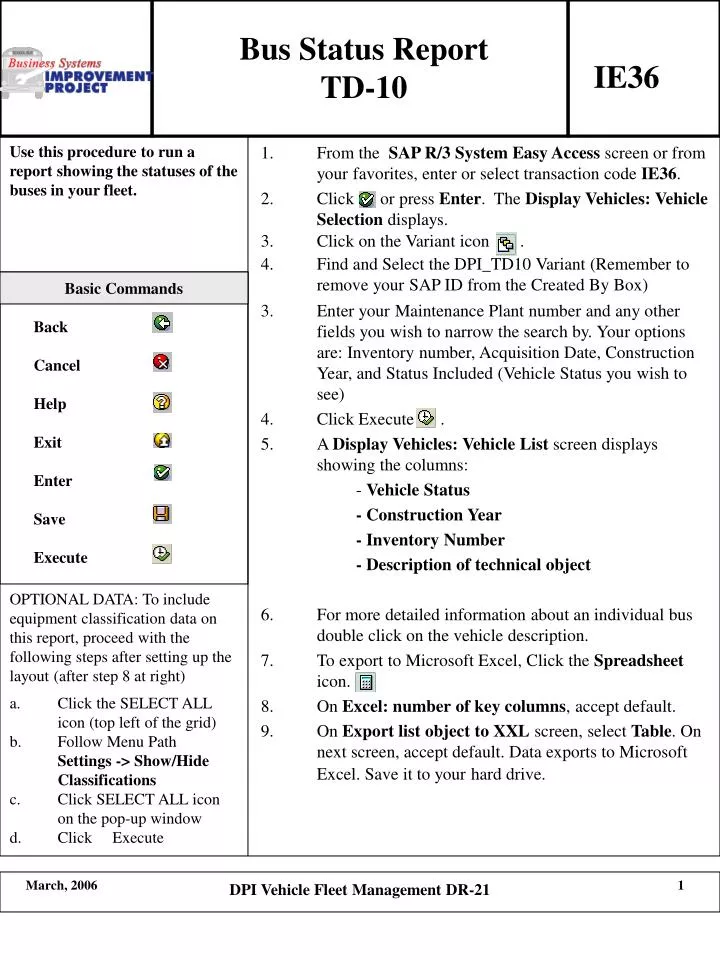
This report details fleet status with equipment classification data. Follow steps after setting up the layout to include this data. Click SELECT ALL icon on top left of grid, then access Menu Path Settings to Show/Hide Classifications and execute DPI Vehicle Fleet Management DR-21 command.

E N D
Bus Status Report TD-10 IE36 Basic Commands Back Cancel Help Exit Enter Save Execute OPTIONAL DATA: To include equipment classification data on this report, proceed with the following steps after setting up the layout (after step 8 at right) • Click the SELECT ALL icon (top left of the grid) • Follow Menu Path Settings -> Show/Hide Classifications • Click SELECT ALL icon on the pop-up window • Click Execute DPI Vehicle Fleet Management DR-21