UM.SiteMaker for Database Driven Websites
Discover the essentials of creating database-driven websites using UM SiteMaker, developed by Dr. Jonathan Maybaum at the University of Michigan Medical School. This guide covers key concepts including when to use a database, planning data tables, and data access sections. Learn about the types of fields available, how to customize forms for different user groups, and effectively utilize value lists for data management. Whether for personal profiles, event organizers, or collaborative projects, UM SiteMaker offers versatile solutions for efficient web development.

UM.SiteMaker for Database Driven Websites
E N D
Presentation Transcript
UM.SiteMaker forDatabase Driven Websites Jonathan Maybaum, Ph.D. Professor of Pharmacology University of Michigan Medical School http://sitemaker.umich.edu/es2004.demo
UM.SiteMaker for Database Driven Websites • Introductions and aspirations (survey) • When to use a database (examples) • The Main Concept:Data Tables Data Access Sections • Planning databases • How to...
UM.SiteMaker for Database Driven Websites Introductions and aspirations • Who are you? • What part of UM are you from? • Do you have an idea of how you mightwant to use Data Tables?
UM.SiteMaker for Database Driven Websites When to use a database? • Repeated instances of data with a common structure • Contact list/Address book • Image gallery • Meeting organizer/Event list • Weblog • Drop box for: • Files from colleagues • Student assignments • Surveys • Meeting registrations • Personal profile/Biosketch • Newsletter (Content management) • Lab inventory
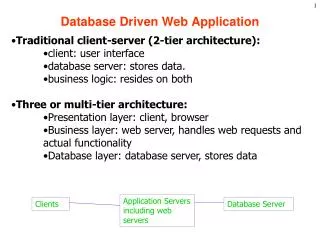
UM.SiteMaker for Database Driven Websites The Main Concept:
UM.SiteMaker for Database Driven Websites Planning a database • Data Tables • Data Access Sections • Fine Tuning/Customization
UM.SiteMaker for Database Driven Websites Planning a database> Data Tables - Purposes for fields • Fields to hold data • Fields for filtering records • Fields for sorting records
UM.SiteMaker for Database Driven Websites Planning a database> Data Tables - System Fields • Every table contains 5 system fields: • Created by • Date created • Modified by • Date modified • Record ID
UM.SiteMaker for Database Driven Websites Planning a database> Data Tables - User Fields • Users can add as many fields as they like, choosing from 6 types: • Text • Number • Date • File • Checkbox • Value List
UM.SiteMaker for Database Driven Websites Planning a database> Data Tables - Value List Fields • Each value list is stored in its own table, then linked back to the main table • A value list can hold text, number or date • When a value list item is revised, records that use the revised item are updated automatically
UM.SiteMaker for Database Driven Websites Planning a database> Data Access (DA) Sections • One DA section per audience, e.g.: • Everyone • UM Users • Class participants • Project collaborators • Administrative assistant • Site owner
UM.SiteMaker for Database Driven Websites Planning a database> DA Sections - Characteristics • Who can get in?(Determined by access groups) • What actions are allowed?(Browse/Search; Add Records; Delete Records) • Which records are available?(Determined by Default Search)
UM.SiteMaker for Database Driven Websites Planning a database> DA Sections - Modes • Each DA Section has four modes: • Single Record View • List of Records View • Add Form • Search Form
UM.SiteMaker for Database Driven Websites Planning a database> DA Sections - Mode Options • Single Record/List of Records • Which fields are visible? • In what order are fields displayed? • Which fields are editable? • Format options (depends on field type) • Standard or custom layout
UM.SiteMaker for Database Driven Websites Planning a database> DA Sections - Mode Options • Add Form • Which fields are visible? • In what order are fields displayed? • Are default values supplied? • Format options (depends on field type)
UM.SiteMaker for Database Driven Websites Planning a database> DA Sections - Mode Options • Search Form • Can be completely customized, but requires knowledge of HTML
UM.SiteMaker for Database Driven Websites Fine Tuning/Customization • Default search with <CurrentUser>, <CurrentDate> • Export/Import • Embedded sections • Custom layouts