Download
1 / 21
210 likes | 324 Views
This lecture explores the integration of authorization and policy management in security architectures, emphasizing federated systems and the need for dynamic response to threats. It discusses single sign-on mechanisms, the role of federated identity standards like Liberty Alliance and Shibboleth, and access control models including Bell-LaPadula, Biba, and role-based access. The focus is on creating coordinated security policies that adapt to changing conditions and enhance overall system security, addressing challenges like authentication, dynamic policy evaluation, and responses to detected intrusions.

E N D
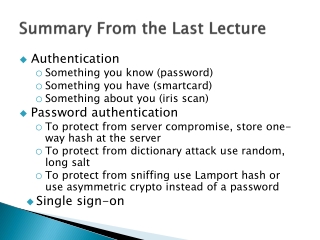
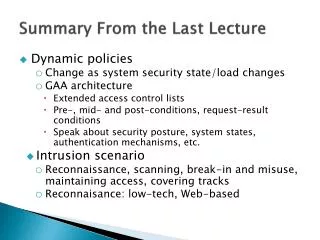
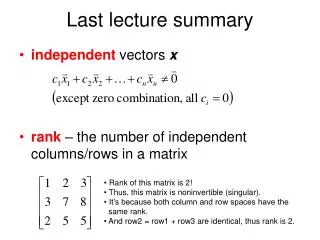
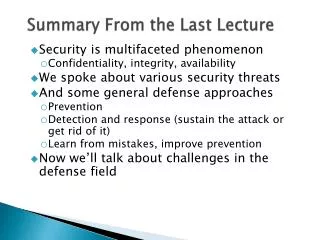
Summary From the Last Lecture • Single sign-on • Centralized and federated passport • Federated Liberty Alliance and Shibboleth • Authorization • Who can access which resource • ACM represented as ACL or capabilities • Discretionary, mandatory and originator-controlled access control • Bell-Lapadula model • Role-based model • Biba integrity model
Security > Mix Of Point Solutions • Today’s security tools work with no coordinated policy • Firewalls and Virtual Private Networks • Authentication and Public Key Infrastructure • Intrusion Detection and limited response • We need better coordination • Not just who can access what, but policy says what kind of encryption to use, when to notify IDS • Tools should implement coordinated policies • Policies originate from multiple sources • Policies should adapt to dynamic threat conditions • Policies should adapt to dynamic policy changes
GAA: Generic Authentication and Authorization Architecture INTRUSION DETECTION Firewalls UNDER ATTACK Web Servers EACL GAA API Databases . . . IPSec Authentication … SECURITY AUDIT RECORDS
GAA: Integration Through Authorization • Focus integration efforts on authorization and the management of policies used in the authorization decision • Applications shouldn’t care about authentication or identity • Separate policy from mechanism • Authorization may be easier to integrate with applications • Hide the calls to individual security services • E.g. key management, authentication, encryption, audit
GAA: Extended ACLs • Positive and negative access right • Conditions on each rule - evaluated in a given order • Sample ACL (http://gost.isi.edu/info/gaaapi/eacl.html) • Tom cannot login to the host • Logins from the specified IP address range are permitted, using either X509 or Kerberos for authentication if previous login attempts <= 3. If the request fails, the number of the failed logins should be updated. The connection duration < 8 h. • Anyone, without authentication, can check the status of the host if his IP is in specified range • Host shut downs are permitted, using Kerberos for authentication. On success, the user ID must be logged. On failure, the sysadmin is sent an e-mail
GAA: Conditions • Pre-conditions • What must be true in order to grant request • Request-result • These conditions must be activated regardless of whether the access is granted or not • Mid-conditions • What must be true during execution of requested operation • Post-conditions • What must be true on completion of requested operation.
GAA-API EACL gaa_get_object_policy_info() T/F/U gaa_check_authorization() T/F/U gaa_execution_control() a.isi.edu, connect, Tom T/F/U gaa_post_execution_actions() System State Three Phases of Condition Evaluation
Policies Originate From Multiple Srcs • Discretionary policies associated with objects • Read from existing applications or EACLs • Local policies merged with object policies • Broadening or narrowing allowed access • Policies imported from policy/state issuers • ID system issues state credentials, These credentials may embed policy as well. • Policies embedded in credentials • These policies attach to user/process credentials and apply to access by only specific processes • Policies evaluated remotely • Credential issuers evaluate policies to decide which credentials to issue.
What Dynamic Policies Enable • Dynamic policy evaluation enables response to attacks: • Lockdown system if attack is detected • Establish quarantines by changing policy to establish isolated virtual networks dynamically • Allow increased access between coalition members as new coalitions are formed or membership changes to respond to unexpected events
Demo Scenario - LockDown • You have an isolated local area network with mixed access to web services (some clients authenticated, some not).
Demo Scenario - LockDown • You have an isolated local area network with mixed access to web services (some clients authenticated, some not). • You need to allow incoming authenticated SSH or IPSec connections.
Demo Scenario - LockDown • You have an isolated local area network with mixed access to web services (some clients authenticated, some not). • You need to allow incoming authenticated SSH or IPSec connections. • When such connections are active, you want to lock down your servers and require stronger authentication and confidentiality protection on all accesses within the network.
Disclaimer Dangerous • Some techniques and tools mentioned in this class could be: • Illegal to use • Dangerous for others – they can crash machines and clog the network • Dangerous for you – downloading the attack code you provide attacker with info about your machine • Don’t use any such tools in real networks • Especially not on USC network • You can only use them in a controlled environment, e.g. DETER testbed
Intrusions • Why do people break into computers? • What type of people usually breaks into computers? • I thought that this was a security course. Why are we learning about attacks?
Intrusion Scenario • Reconnaissance • Scanning • Gaining access at OS, application or network level • Maintaining access • Covering tracks
Phase 1: Reconnaissance • Get a lot of information about intended target: • Learn how its network is organized • Learn any specifics about OS and applications running
Low Tech Reconnaissance • Social engineering • Instruct the employees not to divulge sensitive information on the phone • Physical break-in • Insist on using badges for access, everyone must have a badge, lock sensitive equipment • How about wireless access? • Dumpster diving • Shred important documents
Web Reconnaissance • Search organization’s web site • Make sure not to post anything sensitive • Search information on various mailing list archives and interest groups • Instruct your employees what info should not be posted • Find out what is posted about you • Search the Web with a search engine to find all documents mentioning this company • Find out what is posted about you
Whois and ARIN Databases • When an organization acquires domain name it provides information to a registrar • Public registrar filescontain: • Registered domain names • Domain name servers • Contact people names, phone numbers,E-mail addresses • http://www.networksolutions.com/whois/ • ARIN database • Range of IP addresses • http://whois.arin.net/ui/
Domain Name System • What does DNS do? • How does DNS work? • Types of information an attacker can gather: • Range of addresses used • Address of a mail server • Address of a web server • OS information • Comments