Configuration and Testing Guide for ADAM-4577 Devices
This document outlines the configuration and testing procedures for the ADAM-4577 devices. It includes detailed steps for setting up the devices, including naming, IP configuration, setting serial port parameters, and TCP port number adjustments. Special attention is given to the loopback testing procedure in RS232 mode, ensuring effective communication between paired devices over Ethernet. The guide emphasizes the importance of following the configuration steps correctly to enable successful handshake and data transmission for optimal performance.

Configuration and Testing Guide for ADAM-4577 Devices
E N D
Presentation Transcript
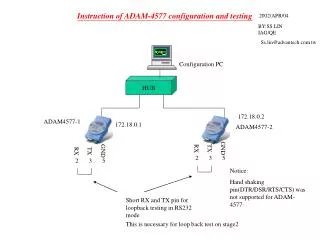
Instruction of ADAM-4577 configuration and testing 2002/APR/04 BY:SS LIN IAG/QE Ss.lin@advantech.com.tw Configuration PC HUB 172.18.0.2 ADAM4577-1 172.18.0.1 ADAM4577-2 GND GND RX TX RX TX 2 3 5 2 3 5 Notice: Hand shaking pin(DTR/DSR/RTS/CTS) was not supported for ADAM-4577 Short RX and TX pin for loopback testing in RS232 mode This is necessary for loop back test on stage2
Stage1 :ADAM4577 configuration step1 Give a name
STEP2 Give an IP
STEP3 Setting serial port parameter
step4 Set TCP port number
Step 5 :follow step 1~4 to configure “paired” second adam4577
step8 Be noticed here is different
STAGE2 :LOOP BACK TEST Step2-1
HUB ADAM4577-1 ADAM4577-2 172.18.0.1 172.18.0.2 GND GND RX TX RX TX 2 3 5 2 3 5 2 3 5 2 3 5 GND GND RX TX RX TX pc2 pc1 Rs232 com port Rs232 com port Now pc1 and pc2 can talking each other via Ethernet