Download
1 / 7
70 likes | 164 Views
Learn how to install a central unit, connect devices, program buttons, and test the alarm. Follow step-by-step instructions for a successful installation process.

E N D
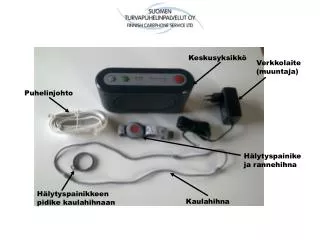
Keskusyksikkö Verkkolaite (muuntaja) Puhelinjohto Hälytyspainike ja rannehihna Hälytyspainikkeen pidike kaulahihnaan Kaulahihna
Hälytyksen perutuspainike Merkkivalot Hälytyspainike Ohjelmointi painike Mikrofoni Kaiutin
Virtakytkin 1 Virta päällä 0 Virta pois päältä Lankapuhelinlinja Rinnakkaispuhelin Verkkolaitteen liitäntä Lukitusruuvi SIM-kortille SIM-korttipaikka
ASENNUS 1. Aloita asennus avaamalla keskusyksikön takakansi painamalla takakannen yläosasta keskeltä ja liu’uttamalla kantta alaspäin 2. Poista takakansi
SIM-kortin asennus POISTA SIM-KORTIN SUOJAUS (PIN KOODI KYSELY) Avaa SIM-kortin Lukitusruuvi T10 Aseta SIM-kortti paikoilleen. Huomioi suunta!
Kytke verkkolaite keskusyksikköön
Sulje takakansi ja kytke puhelinlinja ja verkkolaite, tee koehälytys keskusyksikön painikkeesta ja rannekkeesta.