
Uploaded by
patty
4 SLIDES
232 VIEWS
40LIKES
数字化校园注册
DESCRIPTION
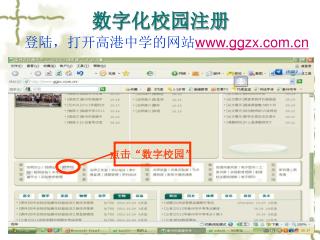
数字化校园注册. 登陆,打开高港中学的网站 www.ggzx.com.cn. 点击“数字校园”. 进入数字校园登陆界面. 点击“高港”. 点击“注册”. 点击“下一步”,按提示完善注册信息. ①. ②. 例如:用户名:李国璋 密码: lgzggzx E-MAIL:184589661@qq.com 安全提示问题:学校名字 安全答案:高港中学. RTX 腾讯通下载及使用. ① 下载地址 打开高港教育网 > 电教装备 > 交流下载 >RTX 腾讯通客户端 ②安装
Download
1 / 4
Download Presentation 
数字化校园注册
An Image/Link below is provided (as is) to download presentation
Download Policy: Content on the Website is provided to you AS IS for your information and personal use and may not be sold / licensed / shared on other websites without getting consent from its author.
Content is provided to you AS IS for your information and personal use only.
Download presentation by click this link.
While downloading, if for some reason you are not able to download a presentation, the publisher may have deleted the file from their server.
During download, if you can't get a presentation, the file might be deleted by the publisher.
E N D
Presentation Transcript
数字化校园注册 登陆,打开高港中学的网站www.ggzx.com.cn 点击“数字校园”
进入数字校园登陆界面 点击“高港”
点击“注册” 点击“下一步”,按提示完善注册信息 ① ② 例如:用户名:李国璋 密码:lgzggzx E-MAIL:184589661@qq.com 安全提示问题:学校名字 安全答案:高港中学
RTX腾讯通下载及使用 ①下载地址 打开高港教育网 > 电教装备>交流下载>RTX腾讯通客户端 ②安装 打开下载好的安装文件 ,按提示点击“下一步”结束软件的安装 ③使用 打开 ;输入账号(自己的手机号码),密码(初始密码为空,登陆后请立即修改);登陆后,点击文件—系统设置—服务器设置,地址:218.90.212.84,端口:8000
More Related