Setting Up Apple TV (2013): iCloud, Bluetooth, and HDMI Connections Explained
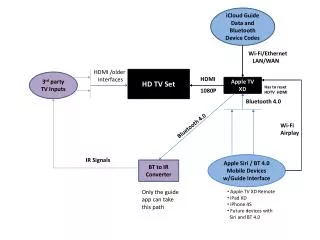
Discover how to set up your Apple TV (2013) using iCloud, Bluetooth, and HDMI connections. This guide covers connecting to Wi-Fi/Ethernet, using the Apple TV remote with Bluetooth and Siri, and controlling video input sources on your HDTV. Learn about compatibility with older interfaces and other devices. With Bluetooth 4.0 and AirPlay, enjoy seamless streaming and control. The ATV Universal Remote can also convert Bluetooth source codes into IR signals for non-Apple devices, enhancing your multimedia experience.

Setting Up Apple TV (2013): iCloud, Bluetooth, and HDMI Connections Explained
E N D
Presentation Transcript
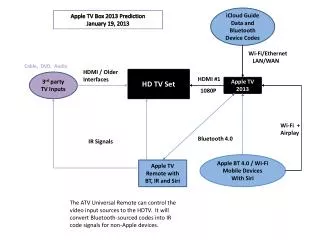
iCloud Guide Data and Bluetooth Device Codes Apple TV Box 2013 Prediction January 19, 2013 Wi-Fi/Ethernet LAN/WAN Cable, DVD, Audio HDMI / Older Interfaces HD TV Set 3rd party TV Inputs HDMI #1 Apple TV 2013 1080P Wi-Fi + Airplay Bluetooth 4.0 IR Signals Apple BT 4.0 / Wi-Fi Mobile Devices With Siri Apple TV Remote with BT, IR and Siri The ATV Universal Remote can control the video input sources to the HDTV. It will convert Bluetooth-sourced codes into IR code signals for non-Apple devices.