Function
Function. 353156 – Microprocessor Asst. Prof. Dr. Choopan Rattanapoka and Asst. Prof. Dr. Suphot Chunwiphat. What is Function ?. Sometimes, you need to do an operation that involve many instructions and you want to use that operation often.


Function
E N D
Presentation Transcript
Function 353156 – Microprocessor Asst. Prof. Dr. ChoopanRattanapoka and Asst. Prof. Dr. SuphotChunwiphat
What is Function ? • Sometimes, you need to do an operation that involve many instructions and you want to use that operation often. • For example : you want to compute an equation f(N, R) • f(N, R) = N! + R! – (N – R)! • You need to compute • N! • (N – R)! • R! • So, you need to code instructions to find factorial 3 times.
Factorial • Factorial of n = n * (n – 1)! = n * (n – 1) * (n – 2)! = n * (n – 1) * (n – 2) *…* 1 • Remind : 0! = 1 • Example : • 5! = 5 * 4 * 3 * 2 * 1 = 120
Code for Computing Factorial • We use 3 variables. Thus, assume we map • Factorial a1 • i a2 • N v1 int Factorial = 1, i; i = N; while (i >= 1) { Factorial = Factorial * i; i = i – 1; } Factorial = 1 i = N i >= 1 true false Factorial = Factorial * i MOV a1, #1 MOV a2, v1 LOOP CMP a2, #1 BLT DONE MUL a1, a2, a1 SUB a2, a2, #1 B LOOP DONE i = i - 1
Code for Computing f(N,R) without using function • Example : Assume that we fix N = 5 and R = 3, f(N, R) = N! + R! – (N – R)! ;Compute (N-R)! -> (2!), A1(Factorial), A2(i), ;(N-R) = 2, Result in A1 MOV a1, #1 ; Factorial = 1 MOV a2, #2 ; i = 2 (=(N-R)) LOOP3 CMP a2, #1 ; Compare i and 1 BLT DONE3 ; if i < 1, jump to DONE1 MUL a1, a2, a1 ; Factorial = Factorial * i SUB a2, a2, #1 ; i = i - 1 B LOOP3 ; jump to Loop1 DONE3 ADD v1, v1, v2 ;N! + R! SUB a1, v1, a1 ; (N! + R!) – (N – R)! ;Compute N!(5!), A1(Factorial), A2(i), N = 5, Result in A1 MOV a1, #1 ; Factorial = 1 MOV a2, #5 ; i = 5 (=N) LOOP1 CMP a2, #1 ; Compare i and 1 BLT DONE1 ; if i < 1, jump to DONE1 MUL a1, a2, a1 ; Factorial = Factorial * i SUB a2, a2, #1 ; i = i - 1 B LOOP1 ; jump to Loop1 DONE1 MOV v1, a1 ; V1 stores result of 5! ;Compute R!(3!) A1(Factorial), A2(i), R = 3, Result in A1 MOV a1, #1 ; Factorial = 1 MOV a2, #3 ; i = 3 (=R) LOOP2CMP a2, #1 ; Compare i and 1 BLT DONE2 ; if i < 1, jump to DONE2 MUL a1, a2, a1 ; Factorial = Factorial * i SUB a2, a2, #1 ; i = i- 1 B LOOP2 ; jump to Loop2 DONE2 MOV v2, a1; V2 stores result of 5! Wow, lot of code, isn’t it ?
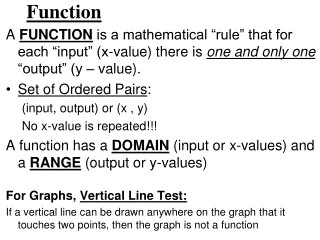
Function : How does it work Input Function Output
Define a Function in C Function name Type of function Function input (parameters or arguments) int power2(int x) { int y; y = x * x; return(y); } Local variable Function instructions Return value from Function
Review : C function (1) #include <stdio.h> int power3(int x) { return( x * x * x); } int main(intargc, char **argv) { int num; num = power3(2); printf(“2^3 = %d\n”, num); } power3 x 8 Main num 2 ? 2^3 = 8
Review : C function (2) #include <stdio.h> int sum(int x, int y) { return(x + y); } int main(intargc, char **argv) { int a = 5, b = 10, f; f = sum(a, b); printf(“Summation of %d and %d = %f\n”, a, b, f); } average x 15 y Main a 5 5 b 10 10 f ? Summation of 5 and 10 = 15
Review : C function (3) • Example : Assume that we fix N = 5 and R = 3, f(N, R) = N! + R! – (N – R)! int main(intargc, char **argv) { int N = 5, R = 3, N_R = 2; intfactorialN = 1, factorialR = 1; intfactorialN_R = 1, result; //Compute N! i = N; while (i >= 1) { factorialN = factorialN * i; i = i – 1; } //Compute R! i = R; while (i >= 1) { factorialR = factorialR * i; i = i – 1; } //Compute (N-R)! i = N_R; while (i >= 1) { factorialN_R = factorialN_R * i; i = i – 1; } //Compute the result of equation result = factorialN + factorialR – factorialN_R; }
Review : C function (4) • Example : Assume that we fix N = 5 and R = 3, f(N, R) = N! + R! – (N – R)! Factorial Function Main Function int Factorial(int x) { inti, factorial = 1; i = x; while (i >= 1) { factorial = factorial * i; i = i – 1; } return factorial; } int main(intargc, char **argv) { int N = 5; int R = 3; int N_R = 2; //Compute the result of equation result = Factorial(N) + Factorial(R) - Factorial(N_R); } Call Functions
Basic of Function Call Caller • Set up arguments • Jump to function • Access result • . • . • . Callee • Access arguments • Compute • Set up return value • Jump back to caller
ARM Procedure Call Standard (APCS) • Conventions for use of register simplification
Instruction Support for Function Call ..... sum(a, b); ..... int sum(int x, int y) { return(x + y); } • Assume • a stores value in V1 register • b stores value in V2 register • How do you know the return address ?? • MOV LR, #0x1010 New version of ARM assembler recommends to use BX LR instead of MOV PC, LR • ARM helps you with BL instruction • BL SUM MOV LR, return_address and then B SUM
Example 1: ARM calculation without function • We want to compute 23 + 33 - 13 • Output will be stored in register a1 AREA ex1_no_func, CODE, READONLY ENTRY start MOV a1, #2 ; Set a1 = 2 MUL v1, a1, a1 ; v1 = a1 * a1 MUL v1, a1, v1 ; v1 = a1 * v1 = 23 MOV a1, #3 ; Set a1 = 3 MUL v2, a1, a1 ; v2 = a1 * a1 MUL v2, a1, v2 ; v2 = a1 * v2 = 33 MOV a1, #1 ; Set a1 = 1 MUL v3, a1, a1 ; v3 = a1 * a1 MUL v3, a1, v3 ; v3 = a1 * v3 = 13 ADD a1, v1, v2 ; a1 = v1 + v2 = 23 + 33 SUB a1, a1, v3 ; a1 = a1 – v3 = (23 + 33)- 13 END
Example 1: ARM calculation with function • We want to code a function called power3 which helps us to compute 23 + 33 - 13 • Output will be stored in register a1 AREA ex1_func, CODE, READONLY ENTRY start MOV a1, #2 ; Set a1 = 2 BL POWER3; Call function MOV a2, a1 ; a2 = 23 MOV a1, #3 ; Set a1 = 3 BL POWER3; Call function MOV a3, a1 ; a3 = 33 MOV a1, #1 ; Set a1 = 1 BL POWER3 ; Call function a1 = 13 ADD a2, a2, a3 ; a2 = 23 + 33 SUB a1, a2, a1 ; a1 = (23 + 33)- 13 B Exit Exit END POWER3 MUL v1, a1, a1 ; v1 = a1 * a1 MUL a1, v1, a1 ; a1 = v1 * a1 BX LR ; return ASM code for computing power3
Example 1: ARM calculation with function • We want to code a function called power3 which helps us to compute 23 + 33 - 13 • Output will be stored in register a1 AREA ex1_func, CODE, READONLY ENTRY start MOV a1, #2 ; Set a1 = 2 BL POWER3; Call function MOV a2, a1 ; a2 = 23 MOV a1, #3 ; Set a1 = 3 BL POWER3; Call function MOV a3, a1 ; a3 = 33 MOV a1, #1 ; Set a1 = 1 BL POWER3 ; Call function a1 = 13 ADD a2, a2, a3 ; a2 = 23 + 33 SUB a1, a2, a1 ; a1 = (23 + 33)- 13 B Exit Exit END POWER3 MUL v1, a1, a1 ; v1 = a1 * a1 MUL a1, v1, a1 ; a1 = v1 * a1 BX LR ; return ASM code for computing power3
Factorial Function in ARM Assembly • We use 2 variables. • a1 result of factorial • a2 input number a1 = 1 a2 >= 1 true false FACTORIAL MOV a1, #1 ;Set result = 1 LOOP CMP a2, #1 ; Compare a2 and 1 BLT DONE ; a2 < 1; jump to DONE MUL a1, a2, a1 ; a1 = a1 * a2 SUB a2, a2, #1 ; a2 = a2 - 1 B LOOP ; jump to Loop DONE BX LR ; return to caller a1 = a1 * a2 a2 = a2 - 1
Computing f(N,R) by using function • Example : Assume that we fix N = 5 and R = 3, f(N, R) = N! + R! – (N – R)! Factorial MOV a1, #1 ;Set result = 1 LOOP CMP a2, #1 ; Compare a2 and 1 BLT DONE ; a2 < 1; jmp to DONE MUL a1, a2, a1 ; a1 = a1 * a2 SUB a2, a2, #1 ; a2 = a2 - 1 B LOOP ; jump to Loop DONE BX LR ; return to caller EXIT END Area func, CODE, READONLY Entry START MOV a2, #5 ; Set argument = 5 BL Factorial; Call function MOV v1, a1 ; Backup result to v1 (5!) MOV a2, #3 ; Set argument = 3 BL Factorial ; Call function MOV v2, a1 ; Backup result to v2 (3!) MOV a2, #2 ; Set argument = 2 BL Factorial; Call function a1 = 2! ADD v1, v1, v2 ; v1 = 5! + 3! SUB a1, v1, a1 ; a1 = (5! + 3!) – 2! B EXIT; End program
Comparing code with and without function AREA nofunc, CODE, READONLY ENTRY START MOV a1, #1 MOV a2, #5 LOOP1 CMP a2, #1 BLT DONE1 MUL a1, a2, a1 SUB a2, a2, #1 B LOOP1 DONE1 MOV v1, a1 MOV a1, #1 MOV a2, #3 LOOP2CMP a2, #1 BLT DONE2 MUL a1, a2, a1 SUB a2, a2, #1 B LOOP2 DONE2MOV v2, a1 MOV a1, #1 MOV a2, #2 LOOP3 CMP a2, #1 BLT DONE3 MUL a1, a2, a1 SUB a2, a2, #1 B LOOP3 DONE3 ADD v1, v1, v2 SUB a1, v1, a1 END AREA func, CODE, READONLY ENTRY START MOV a2, #5 BL Factorial MOV v1, a1 MOV a2, #3 BL Factorial MOV v2, a1 MOV a2, #2 BL Factorial ADD v1, v1, v2 SUB a1, v1, a1 B EXIT Factorial MOV a1, #1 LOOP CMP a2, #1 BLT DONE MUL a1, a2, a1 SUB a2, a2, #1 B LOOP DONE BX LR EXIT END
Assignment 8 • Write a program in ARM assembly to compute 54 – 44 + 34 • Define function called POWER4 to compute x4 • Input argument of function prepares in register a2 • Output of function stores in register a1 • Output of Program stores in register a1