Download
1 / 1
10 likes | 112 Views
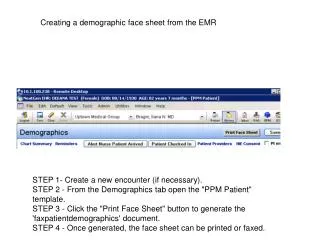
This guide outlines the procedure for creating a demographic face sheet from the Electronic Medical Records (EMR) system. Step 1 involves creating a new encounter if necessary. In Step 2, open the "PPM Patient" template from the Demographics tab. Step 3 instructs you to click the "Print Face Sheet" button to generate the 'faxpatientdemographics' document. Finally, in Step 4, you have the option to print or fax the completed face sheet as needed.

E N D
Creating a demographic face sheet from the EMR STEP 1- Create a new encounter (if necessary). STEP 2 - From the Demographics tab open the "PPM Patient" template. STEP 3 - Click the "Print Face Sheet" button to generate the 'faxpatientdemographics' document. STEP 4 - Once generated, the face sheet can be printed or faxed.