
Uploaded by
marisa
2 SLIDES
160 VIEWS
20LIKES
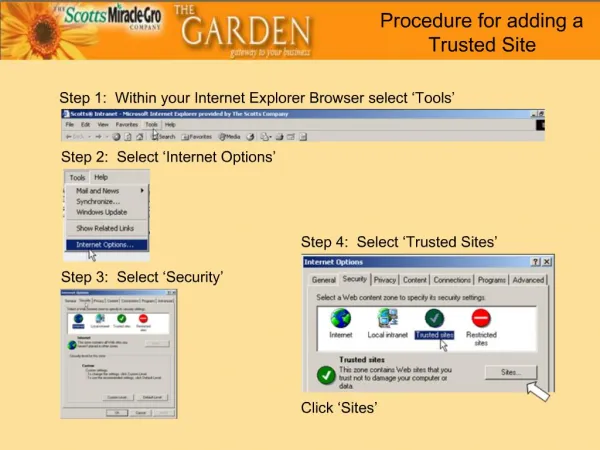
How to Add a Trusted Site in Your Browser: A Step-by-Step Guide
DESCRIPTION
This guide provides a clear and concise procedure for adding a trusted site in various web browsers, enhancing your browsing experience by ensuring security and convenience. Follow the outlined steps for browsers like Chrome, Firefox, Edge, and Safari to manage your trusted sites effectively. With a trusted site, you can enable specific features and access content without being obstructed by security warnings. Stay safe online while enjoying the benefits of trusted sites.
Download
1 / 2
Download Presentation 
How to Add a Trusted Site in Your Browser: A Step-by-Step Guide
An Image/Link below is provided (as is) to download presentation
Download Policy: Content on the Website is provided to you AS IS for your information and personal use and may not be sold / licensed / shared on other websites without getting consent from its author.
Content is provided to you AS IS for your information and personal use only.
Download presentation by click this link.
While downloading, if for some reason you are not able to download a presentation, the publisher may have deleted the file from their server.
During download, if you can't get a presentation, the file might be deleted by the publisher.
E N D
Presentation Transcript





















More Related

Audio
Live Player