IPERF NOTES
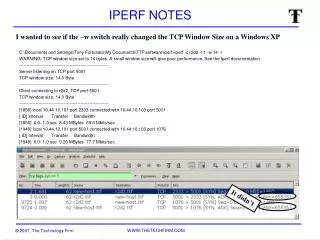
This document contains a detailed overview of a network performance test using Iperf. The test involved connecting to a server named R2D2 with a TCP window size set to 14 bytes. Results indicate that such a small window size significantly affects performance, with tested bandwidth reaching up to 77.7 Mbits/sec. The report highlights the importance of window size adjustments and encourages users to consult Iperf documentation for optimized settings. It provides crucial insights into throughput limitations with particular emphasis on the implications of using a small TCP window size.

IPERF NOTES
E N D
Presentation Transcript
IPERF NOTES C:\Documents and Settings\Tony Fortunato\My Documents\TTF\software\iperf>iperf -c r2d2 -t 1 -w 14 -r WARNING: TCP window size set to 14 bytes. A small window size will give poor performance. See the Iperf documentation. ------------------------------------------------------------ Server listening on TCP port 5001 TCP window size: 14.0 Byte ------------------------------------------------------------ Client connecting to r2d2, TCP port 5001 TCP window size: 14.0 Byte ------------------------------------------------------------ [1856] local 10.44.10.101 port 2333 connected with 10.44.10.103 port 5001 [ ID] Interval Transfer Bandwidth [1856] 0.0- 1.0 sec 8.43 MBytes 69.6 Mbits/sec [1948] local 10.44.10.101 port 5001 connected with 10.44.10.103 port 1076 [ ID] Interval Transfer Bandwidth [1948] 0.0- 1.0 sec 9.26 MBytes 77.7 Mbits/sec I wanted to see if the –w switch really changed the TCP Window Size on a Windows XP It didn’t