Understanding Oracle9i Sequences, Indexes, and Synonyms
This chapter delves into additional database objects in Oracle9i, focusing on the purpose and management of sequences, indexes, and synonyms. Key objectives include defining sequences for generating unique integers, understanding gap occurrences in sequences, and using commands to create, alter, and manage indexes and synonyms effectively. The chapter covers practical examples for using `CREATE SEQUENCE`, `CREATE INDEX`, and `CREATE SYNONYM` commands, as well as insights into how these objects support efficient database operations and data organization.

Understanding Oracle9i Sequences, Indexes, and Synonyms
E N D
Presentation Transcript
Chapter 12Additional Database Objects Oracle9i: SQL
Chapter Objectives • Define the purpose of a sequence and state how it can be used by an organization • Explain why gaps may appear in the integers generated by a sequence • Correctly use the CREATE SEQUENCE command to create a sequence Oracle9i: SQL
Chapter Objectives • Identify which options cannot be changed by the ALTER SEQUENCE command • Use NEXTVAL and CURRVAL in an INSERT command • Explain when Oracle9i will automatically create an index • Create an index, using the CREATE INDEX command Oracle9i: SQL
Chapter Objectives • Delete an index, using the DELETE INDEX command • Create a PUBLIC synonym • Delete a PUBLIC synonym • Identify the contents of different versions of views used to access the data dictionary, based on the prefix of the view Oracle9i: SQL
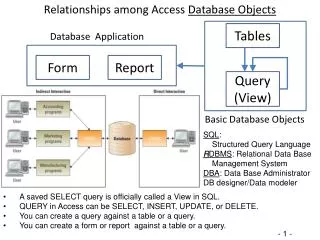
Database Objects • Anything that has a name and defined structure • Includes: • Sequence – generate sequential integers • Index – quickly locate specific records • Synonym – alias for other database objects Oracle9i: SQL
Sequences • Used for internal control purposes by providing sequential integers for auditing • Used to generate unique value for primary key column – no correlation with actual row contents Oracle9i: SQL
CREATE SEQUENCE Command • Various intervals allowed – Default: 1 • Can specify starting number – Default: 1 Oracle9i: SQL
CREATE SEQUENCE Command • Can specify MINVALUE for decreasing sequence, MAXVALUE for increasing • Numbers can be reused if CYCLE specified • ORDER clause for application cluster environment • Use CACHE to pre-generate integers – Default: 20 Oracle9i: SQL
CREATE SEQUENCE Command Example Oracle9i: SQL
Verifying Sequence Values Query USER_SEQUENCES data dictionary view Oracle9i: SQL
Using Sequence Values • NEXTVAL – generates integer • CURRVAL – contains last integer generated by NEXTVAL Oracle9i: SQL
Altering Sequence Definitions • Use ALTER SEQUENCE command • START WITH value cannot be altered – drop sequence and re-create • Changes cannot make current integers invalid Oracle9i: SQL
ALTER SEQUENCE Command Example Oracle9i: SQL
DROP SEQUENCE Command Previous values generated are not affected by removing a sequence from a database Oracle9i: SQL
Indexes • Stores frequently referenced value and row ID (ROWID) • Can be based on one column, multiple columns, functions, or expressions Oracle9i: SQL
Creating an Index • Implicitly created by PRIMARY KEY and UNIQUE constraints • Explicitly created by CREATE INDEX command Oracle9i: SQL
CREATE INDEX Command Example Oracle9i: SQL
Verifying an Index Indexes listed in USER_INDEXES view Oracle9i: SQL
Removing an Index Use DROP INDEX command Oracle9i: SQL
Synonyms • Serve as permanent aliases for database objects • Can be private or public • Private synonyms are only available to user who created them • PUBLIC synonyms are available to all database users Oracle9i: SQL
CREATE SYNONYM Command Syntax Oracle9i: SQL
CREATE SYNONYM Command Example Oracle9i: SQL
Deleting a SYNONYM • A private synonym can be deleted by owner • A PUBLIC synonym can only be deleted by a user with DBA privileges Oracle9i: SQL
Data Dictionary • Stores information about database objects • Owned by user SYS • Cannot be directly accessed by users • Displays contents through data dictionary views Oracle9i: SQL
View Prefixes Oracle9i: SQL