Exploring WPF: A Next-Gen Approach to GUI Development
WPF (Windows Presentation Foundation) is a modern GUI framework that replaces traditional APIs such as GDI, GDI+, and WinForms. Built from the ground up on Direct3D, WPF offers hardware acceleration, vector-based graphics, and a unified approach to UI, documents, and media. Leveraging XAML for declarative programming, WPF bridges the gap between designers and developers, enhancing the application development experience. This overview covers composition, layout controls, and the integration of rich media into applications, solidifying WPF's role in contemporary software development.

Exploring WPF: A Next-Gen Approach to GUI Development
E N D
Presentation Transcript
Windows Presentation Foundation Moderne GUI og Silverlight
WPF Overview Traditional • GDI (25 years), GDI+, WinForms • DirectX (16 years), Direct3D • Quartz, DirectShow (14 years) • Problems • Showing their age • Each API is different • Mixing APIs is challenging
WPF Overview Next Generation • WPF – replaces GDI/WinForms • Direct3D – large games, used by WPF • Media Foundation – ultimately will replace DirectShow • MCML – markup language for Media Center Edition applications • XNA – small games
WPF Overview • Compositing • UI, Documents, Media, 3D, Browser, … • Declarative programming with XAML markup • For Designers and Developers • Rewritten from scratch • Built on top of Direct3D • Hardware accelerated • Vector based • Resolution independent • Retained graphics
WPF Vision • Integrated, vector-based composition engine • Utilizing the power of the PC throughout the graphics stack • Unified approach to UI, Documents, and Media • Integration as part of development and experience • Declarative programming • Bringing designers directly into application development • Ease of deployment • Allowing administrators to deploy and manage applications securely
XAML • XML for Applications Markup Language <Button Name="button1"> Click Me! </Button> Button button1 = new Button(); button1.Content = "Click Me!";
XAML: Properties • As attributes or elements <Button Content="Click Me!" Background="LightGreen" /> <Button> <Button.Background> LightGreen </Button.Background> Click Me! </Button>
XAML: Attached Properties <Canvas> <Button Canvas.Top="30" Canvas.Left="40"> Click Me! </Button> </Canvas>
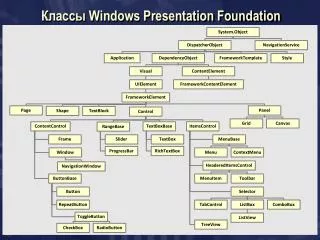
WPF Layout and Controls • Class hierarchy
Layout Controls • StackPanel • WrapPanel • Canvas • DockPanel • Grid • ...
Simple Controls • PasswordBox • ScrollBar • ProgressBar • Slider • TextBox • RichTextBox • ...
Content Controls • Button • RepeatButton • ToggleButton • CheckBox • RadioButton • Label • Frame • ListBoxItem • StatusBarItem • ScollBarViewer • ToolTip • UserControl • Window • NavigationWindow • ...
Headered Content Controls • Expander • GroupBoxItem • TabItem • ...
Items Controls • Menu • ContextMenu • StatusBar • TreeView • ListBox • ComboBox • TabControl • ...
LooklessControls • Control implies behaviour • Probably supplies default look • Designer free to supply new look
Designer Developer Developer or Designer?