Repetition
Repetition. Repetition. Conditional loops while do while Counting loops for loops Arrays Recursion. Loops. Loop Introduction. Loops allow statements to be repeated The code to be repeated is in the loop body One repetition of the body is called an iteration

Repetition
E N D
Presentation Transcript
Repetition • Conditional loops • while • do while • Counting loops • for loops • Arrays • Recursion
Loop Introduction • Loops allow statements to be repeated • The code to be repeated is in the loop body • One repetition of the body is called an iteration • Loops are structurally like if statements • The loop control statement(s) are contained in ()s after the keyword • The loop body is contained in {}s
While Loop • A while loop consists of the keyword while, a condition and a loop body • The condition is a Boolean expression • Just like an if statement condition • The loop iterates until the condition is no longer true (while it is true) • The loop body should include code that eventually makes the condition false • Or the loop will iterate for ever (an infinite loop)
Factorial Write a function that returns the factorial of the integer parameter: e.g. fact(5) = 5! = 5 * 4* 3 * 2 * 1 = 120 • // PRE: x must be a +ve integer • // Function that returns the factorial of x • long longfact(intx){ • long longresult = 1; • inti = 1; //loop control variable • while (i <= x){ • result = result * i; • i++; • } • return result ; • } don't put a ; here – it makes an empty loop i must be incremented in the loop The function does not handle –ve numbers Note the indentation of the statements in the function and the loop
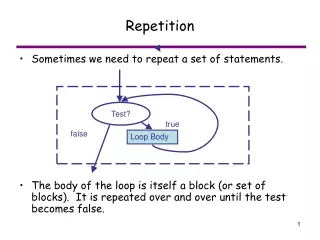
While Flowchart • while statements contain a condition • If the condition is truethe body is executed • Then the condition is tested again • If the condition is false the program continues from the end of the loop body ... program ... condition true false Loop body Rest of program
Entry Condition • A while loop has an entry condition • If the condition is initially false the loop body will not be processed at all • Sometimes the first iteration should occur outside of and before the loop • So that the variable being evaluated in the condition can be initialized appropriately
Summing Numbers Write a function that sums numbers until the user enters 0 • // Function that returns the sum of values • // entered by the user • intsum(){ • intresult = 0; • int next; • printf("Enter a number, 0 to end"); • scanf("%d", &next); • while(next != 0){ • result += next; • printf("Enter a number, 0 to end"); • scanf("%d", &next); • } • return result ; • } Because next controls the loop it needs a value before the loop starts Although there are some alternatives: Initialize next to non-zero and then get input before adding to result, or Use a do ... while loop
Do While Loop • A do ... while loop's condition comes after the loop body • The loop body will iterate at least once • Whereas a while loop will not iterate at all if the condition is initially false • Any do ... while loop can be replaced by while • Possibly needing some extra statements before the loop statement • Some people prefer while loops because the condition comes first
Do While Factorial Write a function that returns the factorial of the integer parameter: e.g. fact(5) = 5! = 5 * 4* 3 * 2 * 1 = 120 • // PRE: x must be a +ve integer • // Function that returns the factorial of x • long longfact2(intx){ • long longresult = 1; • inti = 1; //loop control variable • do { • result = result * i; • i++; • } while (i <= x); • return result ; • } note the ; after the condition
Counting Loops • Loop bodies are often repeated a certain number of times • Rather than ending at an indeterminate time • e.g. factorial function, processing the values in a list • For loops can be used to iterate a given number of times • By incrementing an integer variable • And ending when the variable reaches a value • For loops can do anything that while loops can
For Factorial Write a function that returns the factorial of the integer parameter: e.g. fact(5) = 5! = 5 * 4* 3 * 2 * 1 = 120 • // PRE: x must be a +ve integer • // Function that returns the factorial of x • long longfact3(intx){ • long longresult = 1; • for (inti= 1; i <= x; i++){ • result = result * i; • } • return result ; • } The loop control statement consists of three statements initialization condition increment In this example the loop control variable is also declared in the initialization statement
Controlling For Loops Initialization • for statements consist of three expressions • Separated by ;s • Initialization • Executed once • Condition • Tested before the first iteration and • Each after each iteration • Increment • Applied after each iteration condition true Loop Body false Increment Rest of Program
More About for Loops • It is usual to use for loops as counting loops • Initialize the loop control variable • Test to see if the end of the count is reached • Increment the count (the loop control variable) • The for loop structure is much more general • An expression evaluated once at the beginning • A condition that is evaluated before each iteration • The body is only executed if the condition is true • An expression evaluated once after each iteration
Comma Operator • The comma operator evaluates a list of expressions returning the last expression • e.g. z = (x = 1, y = x + 1); • x = 1 is evaluated first (assigning 1 to x) • y = x + 1 is then evaluated (assigning 2 to y) • The comma expression returns the value of y • So z is also assigned 2 • It is most commonly used in for loops • To allow multiple initialization or increment statements
break and continue • The break and continue statements can be used to change flow of control • The break statement terminates the processing of a loop or switch statement • It ends evaluation of its enclosing body • And switches control to the next statement after the closing } • The continue statement terminates the processing of the current loop iteration • And then continues with the loop, first testing its condition • Like goto, continue and break can make programs harder to understand
Nested Loops • Like if statements, loops can be nested • One loop can contain another loop • The use of functions can make nested loops easier to understand • Particularly if one of the nested loops is placed inside a function • Nested loops may cause a program to run slowly • But may also be unavoidable
Which Loop? • There is a large element of choice • What you can do with one loop, you can do with another • For loops are a natural choice for counting with an index • While loops are a natural choice for indefinite iteration • Such as when the loop ends based on user input
Character I / O • The scanf and printf functions are generalized input and output functions • There are also specialized input and output functions • Particularly relating to characters and strings • The getchar and putchar functions are designed for character I/O
getchar() • The getchar() function takes no arguments and returns the next character from input charch; ch = getchar(); • getchar() will read any character, including whitespace characters • Note that pressing Enter still indicates that input should be processed
putchar() • The putchar(char) function prints its argument charch = 'a'; putchar(ch); • Neither getchar or putcharrequire format specifications • Since both functions work only with characters • Both functions are defined in stdio.h
Counting Letters Write a function that prints the number of 'e' characters in a sentence void e_count(){ charch; int count = 0; ch = getchar(); while(ch != '\n'){ if(ch == 'e'){ count++; ch = 'E'; } putchar(ch); ch = getchar(); } printf("\n\nYour input contained %d 'e's\n\n",count); }
Complex Expressions • The function shown previously has an initial call to getchar before the while statement • And contained a call to getchar in the loop body • These calls can be made in the while condition important! //... ch = getchar(); while(ch != '\n'){ //... ch = getchar(); } //... //... while((ch = getchar()) != '\n'){ //... } //... without the brackets
Character Functions • ctype.h contains character functions • There are two functions to change the case of a character • toLower(char) • If the argument is uppercase it returns the lowercase version, otherwise it returns the original argument • toUpper(char) • If the argument is lowercase it returns the uppercase version, otherwise it returns the original argument
More Character Functions • Test functions that return true (1) or false(0) • isalnum(char) – alphanumeric (alphabetic or numeric) • isalpha(char) – alphabetic • isblank(char) – space, tab or newline • iscntrl(char) – control character (like Ctrl+C) • isdigit(char) – digit • isgraph(char) – a printable character, except space • islower(char) – lowercase character • isupper(char) – uppercase character • ispunct(char) – punctuation • isprint(char) – a printable character • isspace(char) – a space • isxdigit(char) – a hexadecimal digit A printable character is one that can be printed – in contrast to a control character
Arrays • Introduction • Array fundamentals • Declaring arrays • Indexing arrays • Initializing arrays • Arrays and functions • Keeping track of array size
Array Introduction • An array is a sequence of values of the same type • Like a list of values • Each value is a single element of the list • An array is a collection of values • The entire collection can be referenced, or • Its individual elements
Average Grades • Let’s say we want to write a program to input grades for a course • Assume that 44 students are registered • We will input each grade, one at a time and store them • Once the grades have been input we will use them to calculate the average grade
Average Grades … • In a world without arrays (or similar structures) we need a separate variable for each grade double grade1 = 0; double grade2 = 0; double grade3 = 0; … double grade42 = 0; double grade43 = 0; double grade44 = 0; Let's assume that these are global variables declared outside the main function
Average Grades … • We need to input the data into each variable • We also need to make sure that grades are entered in the correct variables if(count == 1) scanf(&grade1); else if(count == 2) scanf(&grade2); … else if(count == 44) scanf(&grade44); Assume that input is from the keyboard This big, ugly IF statement should go in an input function
Average Grades … • Assume that all of the grades have been entered • We can now calculate the average • Let’s make a separate function to do this • doublegetAverage() • Ideally, functions should be self contained • Input is passed using a parameter list • And the desired output is returned • But we would need 44 parameters for this function! • So, let’s just use the previously defined global variables
Average Grades … doublegetAverage (){ double sum = 0; sum += grade1; sum += grade2; sum += grade3; sum += grade4; sum += grade5; sum += grade6; sum += grade7; sum += grade8; sum += grade9; This is what the getAveragefunction would look like …
Average Grades … // … sum += grade10; sum += grade11; sum += grade12; sum += grade13; sum += grade14; sum += grade15; sum += grade16; sum += grade17; sum += grade18; sum += grade19; You can’t put this in a loop because the variable that is added is different each time
Average Grades … // … sum += grade20; sum += grade21; sum += grade22; sum += grade23; sum += grade24; sum += grade25; sum += grade26; sum += grade27; sum += grade28; sum += grade29; Good thing it’s not a class with 250 students in it or this would be really boring
Average Grades … // … sum += grade30; sum += grade31; sum += grade32; sum += grade33; sum += grade34; sum += grade35; sum += grade36; sum += grade37; sum += grade38; sum += grade39; Are we there yet?
Average Grades … // … sum += grade40; sum += grade41; sum += grade42; sum += grade43; sum += grade44; returnsum / 44; } Right, done, that’s it!
… And Finally … • Here is the same function, this time assuming that the grade data was stored in an array doublegetAverage(doublearr[], intsize){ double sum = 0; for(inti = 0; i < size; ++i){ sum += arr[i]; } return sum / size; }
What Is An Array? • An array variable is a collection of other variables • You can think of an array as something that contains variables • This is important because an integer array is not an integer, it is a collectionof integers • The items stored in an array (elements) are stored sequentially in main memory • This is an important implementation issue
Declaring Arrays • An array is declared with a type, and []s to indicate that the variable is an array • The type is the type of the contents of the array size of the array intscore[10] type of the data stored in the array brackets declare the variable as an array
Array Indexing • The elements of the array are accessed using an index • Indexes are the addresses of the elements • The first element always has an index of 0 • The last index is always array size – 1 • Array indexes follow the name of the array and are enclosed in []s • Individual array elements are used in exactly the same way as variables
Using an Array intarr[4]; int x; for(inti = 0; i < 4; ++i){ arr[i] = i + 1; } x = arr[2]; //access 3rd. element result of the statements shown above represents stack memory, where each cell represent 4 bytes
Initializing Arrays • Array elements have to be given values individually • Although this can be performed in a loop • There is a special shorthand notation for initializing arrays when they are declared • intarr[] = {1, 3, 7, 9}; • This shorthand notation is only allowed on the same line as the declaration
Array Size • Array size must be specified when the array is declared • It must be a literal (a number) or • A constant • The size can not be given using a variable • Therefore an array's size cannot change during the life of a program • It is specified at compile time
Arrays and Loops • Arrays are often processed using loops • Each element in an array is accessed in turn • The loop control variable is used as an index into the array • The loop terminates once every element of the array has been processed • When the loop control variable is equal to the size of the array
For Loops // Assume an int array named arr, // and a constant called ARR_SIZE // The loop prints the contents of arr for (inti = 0; i < ARR_SIZE; i++){ printf("%d\n", arr[i]); } The condition is i < ARR_SIZE because the last legal index is ARR_SIZE – 1
While Loops // Assume an int array named arr, // and a constant called ARR_SIZE // The loop prints the contents of arr inti = 0; while (i < ARR_SIZE){ printf("%d\n", arr[i]); i++; } A very similar loop to the for loop, don't forget to increment the index, i
Size as a Constant • It is much better to define array size as a constant than to use a literal value • If the programmer wants to change the array size this only needs to be done once • Use the constant whenever the array size is referenced, and • Avoid using magic numbers!