
Uploaded by
lada
1 SLIDES
132 VIEWS
10LIKES
Control Cloud Movement in Simulation
DESCRIPTION
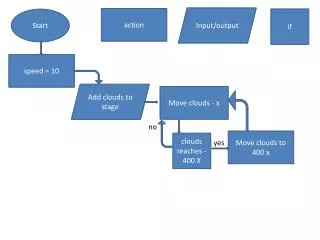
This script initiates the movement of clouds in a simulation environment. By setting the speed to 10, clouds are added to the stage and moved horizontally to the target position at 400 units on the x-axis. The action is conditional on whether the clouds reach the defined position, allowing for dynamic adjustments in the simulation based on cloud movement. The ability to control the speed and direction of clouds enhances the visual effects and overall realism of the environment, making it essential for developing immersive scenes.
Download
1 / 1
Download Presentation 
Control Cloud Movement in Simulation
An Image/Link below is provided (as is) to download presentation
Download Policy: Content on the Website is provided to you AS IS for your information and personal use and may not be sold / licensed / shared on other websites without getting consent from its author.
Content is provided to you AS IS for your information and personal use only.
Download presentation by click this link.
While downloading, if for some reason you are not able to download a presentation, the publisher may have deleted the file from their server.
During download, if you can't get a presentation, the file might be deleted by the publisher.
E N D
Presentation Transcript
Input/output action if Start speed = 10 Add clouds to stage Move clouds - x no Move clouds to 400 x clouds reaches -400 X yes










More Related