Simplifying Structural Design Patterns with Façade and Decorator
Understand how Façade simplifies interactions with complex systems, and how Decorator adds dynamic responsibilities to objects. Explore examples, structures, sequences, and code samples in Java.


Simplifying Structural Design Patterns with Façade and Decorator
E N D
Presentation Transcript
Structural Design Patterns Yaodong Bi October 23, 2019
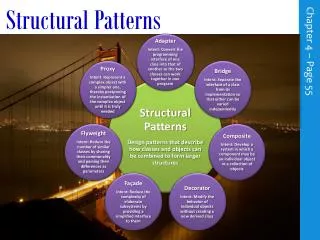
Structural design patterns • Façade • Decorator • Composite • Proxy • Adapter • Bridge • Flyweight
Façade • Design Purpose • Provide a single and simple interface to a package of classes • Design Pattern Summary • Define a single and simple interface for clients to use the functionality of the package
Façade - examples • A compiler package • It normally contains many classes/subpackages like Scanner, Parser, etc. • Most clients only want to compile their programs, i.e., they don’t care about functions of individual components in the package • Use Façade to provide a simple default interface to most clients.
Client Use op1(), op2(), op3(), and op4() Facade op1() op2() op3() op4() Façade - Structure ClassA op3_a() ClassC op4_c() ClassB op1_b() op2_b()
Sequence Diagram Client Facade B:ClassB A:ClassA C:ClassC op1() op1_b() op3() op3_a() op4() op4_c() op2() op2_b()
Client Compiler.compile(“test.c”) Compiler compile() Façade - Structure ProgramNodeBuilder Scanner Parser CodeGenerator
Class Scanner { public Scanner(InputStreamsourcecode) public Token scan() { … } } Class Parser { public parse(Scanner s, ProgramNodeBudiler p) { … } } Class ProgramNodeBuilder { public ProgramNodenewVariable(…) { … } public ProgramNodenewAssignment(…) { … } public ProgramNodenewReturnStmt(…) { … } } Class CodeGenerator { public void visitStatementNode(…) { … } public void visitExpressionNode(…) { … } } Façade – Sample code Class Compiler { public void compile(InputStream sc, OutputStreambytecode) { Scanner sc = new Scanner(sc); ProgramNodeBuilderpnb = new ProgramNodeBuilder(); Parser parser = new Parser(); parser.parse(sc, pnb); IntelCodeGenerator cg = new IntelCodeGenerator(bytecode) ProgramNodenodetree = pnb.getRootNode(); parsetree.traverse(cg); }
Façade - Examples framework Customer getCustomerName() getNumAccounts() getPersonalNote() getAccount( int ) AccountException Account getAccountNum() deposit( int ) getBalance() CustomerException BankCustomers 1..n BankCustomer BankAccount Client BankCustomers doDeposit( int amt, Customer cust, Account acc ) getBankAccount( Customer cust, int accNum ) getBankCustomer( String custName )
Façade - comments • Façade can reduce the degree of dependency between packages • Packages are dependent on each other only through their facades, not individual classes • Use Façade to provide a simple default view of the package that is enough for most clients • Façade does not try to encapsulate/hide the components in the package since there may be clients who need to access individual components in the package
Decorator • Design Purpose • Add responsibilities to an object at runtime. • Design Pattern Summary • Provide for a linked list of objects, each encapsulating responsibility.
Decorator - examples • The word processor example • A text view may have a border and a scroll bar and maybe other bells and whistles attached to it • How can those bells and whistles be added to the text view? • Inheritance?
Decorator – structure Component operation() Client ConcreteComp operation() Decorator Operation() comp void operation() { // do actions of the decorator comp.operation(); // do actions of the decorator }
Decorator – structure VisualComponent draw() Client TextView draw() Decorator draw() comp comp.draw() ScrollDecorator draw() scrollTo() scrollPosition BorderDescrotor draw() drawBorder() borderWidth super.draw() this.drawBorder()
Decorator – examples Client :Decorator1 :Decorator2 :ConcreteComp
Decorator - Sequence Diagram Client Component :Decorator1 :Decorator2 :ConcreteComp operation() operation() operation() operation() return return return return
Decorator – examples :Reader 1 : BufferedStreamReader :InputStreamReader System.in:InputStream
Decorator – examples : BufferedStreamReader :InputStreamReader System.in:InputStream
Decorator – key concept • allows addition to and removal from objects at runtime
Decorator – sample in Java interface VisualComponent { public void draw(); } public class Decorator implements VisualComponent { private VisualComponent component; public Decorator(VisualComponent comp) { this.component = comp; } public void draw() {component.draw(); } } public class Border extends Decorator { int width = 0; public Border(VisualComponent comp, int width) { super(comp); this.width = width; } public void draw() { System.out.print("Border["+ width + "]"); super.draw(); System.out.print("[" + width + "]Border"); } } public class TextView implements VisualComponent { private String text = null; public void setText(String text) { this.text = text; } public void draw() { System.out.print("--" + text + "--"); } } public class Scroll extends Decorator { public Scroll(VisualComponent stream) { super(stream); } public void draw() { System.out.print("Scroll["); super.draw(); System.out.print("]Scroll"); } }
Decorator – sample in Java public class Driver { public static void main(String[] args) { TextViewtextView = new TextView(); textView.setText("Hello World!"); System.out.println("\n\TEXIVIEW ONLY "); Window window = new Window(textView); window.draw(); System.out.println("\n\nWITH SCROLL "); VisualComponent comp = new Scroll(textView); window.setComponent(comp); window.draw(); System.out.println("\n\nSCROLL + BORDER"); comp = new Border(new Scroll(textView), 3); window.setComponent(comp); window.draw(); } } public class Window { private VisualComponent component; public Window(VisualComponent comp) { this.component = comp; } public void setComponent(VisualComponent comp) { this.component = comp; } public void draw() { component.draw(); } }
Decorator – sample in C++ class VisualComponent { virtual void Draw(); virtual void Resize(); }; Class TextView: public VisualComponet { void draw(0 { // draw } void resize() { // resize }; } class Decorator : public VisualComponent { Decorator(VisualComponent*); void Decorator::Draw () { _component->Draw(); } VisualComponent* _component; }; class BorderDecorator : public Decorator { BorderDecorator(VisualComponent*, int borderWidth); void Draw(){ Decorator::Draw(); DrawBorder(_width); } private void DrawBorder(int); private int _width; }; Class Window { void SetContents(VisualComponent* contents) { // ... } Class Driver { public static void main() { Window* window = new Window(); TextView* textView = new TextView; window->SetContents(textView); Window.draw(); // textview only window->SetContents( new BorderDecorator( new ScrollDecorator(textView), 1 ) ); Window.draw(); // textview with a border // and scrolls. } }
Composite • Design Purpose • Represent a Tree of Objects • Design Pattern Summary • Use a Recursive Form in which the tree class aggregates and inherits from the base class for the objects.
Composite - structure Objects Classes 1..n Component non-leaf node “non-leaf nodes have one or more components” “every object involved is a Component object” leaf node NonLeafNode
Composite - structure Component add( Component ) Remove(component) doIt() 1..n Client comp LeafNode doIt() NonLeafNode doIt() for all elements e in comp e.doIt() TypeANonLeafNode doIt() TypeBNonLeafNode doIt()
Composite – A Class Diagram :Client N0:NonLeafNode N1:NonLeafNode N2:NonLeafNode L3:LeafNode L2:LeafNode L1:LeafNode
Composite – sequence diagram :Client N0:NonLeafNode N1:NonLeafNode L1:LeafNode L2:LeafNode L3:LeafNode N2:NonLeafNode doIt() doIt() doIt() doIt() doIt() doIt()
Composite – examples Component 1..n Composite in java.awt Container component … . . Window Canvas
Proxy • Design Purpose • Avoid the unnecessary execution of expensive functionality in a manner transparent to clients. • Design Pattern Summary • Interpose a substitute class which accesses the expensive functionality only when required.
Proxy – examples Instantiate with Proxy object BaseActiveClass expensiveMethod() anotherMethod() Client Proxy expensiveMethod() anotherMethod() RealActiveClass expensiveMethod() anotherMethod() if ( realActiveObject == null ) // not loaded yet { realActiveObject = getRealActiveObject(); realActiveObject.expensiveMethod(); } else { realActiveObject.expensiveMethod(); }
Proxy – sequence diagram Client BaseActiveClass Proxy RealActiveClass expensiveMethod() create() if needed expensiveMethod()
Proxy – examples Instantiate with Proxy object Graphics Display() TexDoc graphics Image display() bitmap ImageProxy display() fileName image if ( image == null ) { // not loaded yet image = new Image(fileName); } Image.display();
Class TextDoc { graphics g; TextDoc(Graphics ip) { g = ip; } void display() { g.display(); } } Class ImageProxy implements Graphics { FileNamefileName; Image image; ImageProxy(FileNamefn) { fileName = fn; } display() { if (image == null) image = new Image(fileName); image.display(); } } Proxy – Sample code Interface Graphics { display(); } Class Image Implements Graphics { Bitmap bitmap; Image(FileName fn) { bitmap = readImage(fn); } display() { // draw the bitmap } readImage(FileName fn) { // read from the file(fn) // create a bitmap } }
Adapter • Design Purpose • Allow an application to use external functionality in a retargetable manner. • Design Pattern Summary • Write the application against an abstract version of the external class; introduce a subclass that aggregate the external class.
Adapter - examples • Interact with legacy systems • When you design a new system which has to interact with a legacy system, you may not want to the new system tightly coupled with (or dependent upon) the legacy system since the legacy system may be replaced in the future. • Using 3rd party systems • You may want to be able to easily substitute the current 3rd party system with another one.
Client Object Adapter - Structure Target +request() Adaptee +requestedMethod(); adaptee Adapter +request() adaptee.requestedMethod()
Adapter – sequence diagram Client Target Adapter Adaptee request(TargetIn):TargetOut request(TargetIn):TargetOut convert(TargetIn):AdapteeIn requestedMethod(AdapteeIn):AdapteeOut Return TargetOut Return TargetOut convert(AdapteeOut):TargetOut
Object Adapter – sample code Interface Target { public TargetOut request(TargetIn); } Class Adaptee { … public AdapteeOut requestedMethod(AdapteeIn) { // produce AdapteeOut; return AdapteeOut; } … } Class Adapter implements Target { private Adapteeadaptee; public Adapter(Adapteead) { adaptee = ad; } public TargetOut request(TargetInti) { AdapteeInai = convert(ti); AdapteeOutao = adaptee.requestedMethod(ai); return convert(ao); } private AdapteeInconvert(TargetInti) { // convert TargetIn to AdapteeIn } private TargetOut convert(AdapteeOutao) { // convert AdapteeOut to TargetOut } }
DrawingTool Object Adapter - Example Shape +boundingBox() +createManipulator() TextView +getExtent(); text TextShape +boundingBox() +createManipulator() text.getExtent() return new TextManipulator()
Design for Adaption • Pluggable Adapters • A small set of operations is specified for adapter & adaptee to implement • Using Abstract Operations • Client and target are the same entity • Adapter overrides abstract operations to delegate operations to adaptee • Using Delegate Objects • A delegate interface specifies operations the adapter needs to implement
Adapter - comments • An adapter may have more than one adaptee • There may not be a one-to-one correspondence between operations of Target and those of Adaptee • So it is possible that an operation of Target is realized with two separate adaptee classes. • The pattern decouples Client from adaptee. • When a different adaptee is needed, we only need to change to another adapter and the client does not need to change at all.
Structural Patterns - Summary • Facade provides an interface to collections of objects • Decorator adds to objects at runtime • Composite represents trees of objects • Proxy avoids calling expensive operations unnecessarily • Adapter decouples client from an existing system