Download
1 / 12
120 likes | 236 Views
This guide covers the calculation of correlation and T-tests in Excel, useful for analyzing relationships and differences between variables. You'll learn to use the CORREL function for correlation assessment and the TTEST function to determine if two sample means are statistically different. The interpretation of results, including understanding p-values for statistical significance, is also provided. Gain insights into handling GNP per capita, treatment, and control groups, along with their implications in research.

E N D
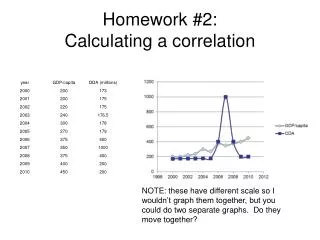
Homework #2:Calculating a correlation NOTE: these have different scale so I wouldn’t graph them together, but you could do two separate graphs. Do they move together?
Calculating a correlation in Excel • Click on an empty cell and click on Insert function. • Choose Correlation (either Correl or Pearson will work) • Highlight array #1 (i.e. highlight the entire GNP/capita series) and then choose the second array (i.e. tech, ed., etc). Both arrays should span the same time period and have the same number of observations
Interpretation (+) positive relationship between the two variables (1 would be a perfect correlation). They move together. (-) Negative relationship (-1 would be perfectly negative correlation). They move in the opposite direction 0 If it is close to zero, there is no correlation.
Are the results reliable? A T-test simply measures whether there is a reliable difference between two means Treatment group Average collection Control group Average collection
Calculating a t-test(for unpaired samples, unequal variance) T statistic= difference between groups Variance within groups
Excel's TTEST Excel takes the T statistic and the degrees of freedom (based on the sample size (N-2)) to calculate a p-value: a test to see if you results are statistically significant When you do TTEST in Excel, it will return the p-value
P values: The smaller, the more significant! Statistical significance Good*: If it is less than 0.1 then the two samples are statistically different There’s a 1/10 chance that the difference is due to chance Better**: If it is less than 0.05 There’s a 1/20 chance that the difference is due to chance Best***: Less than 0.01 There’s a 1/100 chance that the difference is due to chance
Using Excel to calculate a t-test Click on empty cell Insert function TTEST Choose first array (control) Choose second array (treatment) Choose 2 tailed distribution Choose 3 sample unequal variance Enter Result shows p value.
Excel calculation Calculate the following: • Mean of control, Mean of treatment • P-value of TTEST
Excel calculation Calculate the following: • Mean of control, Mean of treatment 0.966667 and 1.4 • Pvalueof TTEST 0.143184 > 0.10 so NOT statistically significant at 10% level