Download
1 / 1
10 likes | 119 Views
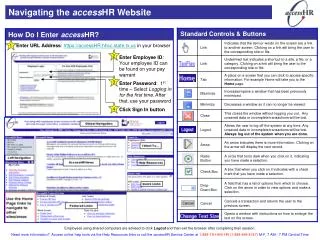
This guide provides clear instructions on how to access the accessHR website. Start by entering the URL: https://accessHR.hhsc.state.tx.us in your browser. Next, input your Employee ID, which can be found on your pay warrant. For first-time users, select “Logging in for the first time” to set your password. After signing in, remember to click the Sign In button. If using a shared computer, be sure to log out and exit the browser afterward. For further assistance, access online help resources or contact the accessHR Service Center at 1-888-TX-HHS-HR (1-888-894-4747), available M-F, 7 AM - 7 PM CT.

E N D
Navigating the accessHR Website How Do I Enter accessHR? 1 Enter URL Address: https://accessHR.hhsc.state.tx.us in your browser 2 Enter Employee ID: Your employee ID can be found on your pay warrant 3 Enter Password: 1st time – Select Logging in for the first time. After that, use your password 4 Click Sign In button Employees using shared computers are advised to click Logout and then exit the browser after completing their session. Need more information? Access online help tools via the Help Resources links or call the accessHR Service Center at 1-888-TX-HHS-HR (1-888-894-4747) M-F, 7 AM - 7 PM Central Time