Download

1 / 0
Martin Professional M1 TM
0 likes | 156 Views
Martin Professional M1 TM. The all-in-one control solution!. Introduction. Why do you need it?. What is so special…?. Key features. Milestone. Quality. Performance. Ease of use. Ergonomic. Lighting is about contrast…. Adding Universes. Options. Marketing material. Dimensions - Open.

Download Presentation 
Martin Professional M1 TM
An Image/Link below is provided (as is) to download presentation
Download Policy: Content on the Website is provided to you AS IS for your information and personal use and may not be sold / licensed / shared on other websites without getting consent from its author.
Content is provided to you AS IS for your information and personal use only.
Download presentation by click this link.
While downloading, if for some reason you are not able to download a presentation, the publisher may have deleted the file from their server.
During download, if you can't get a presentation, the file might be deleted by the publisher.
E N D
Presentation Transcript
- Martin Professional M1TM The all-in-one control solution!
- Introduction
- Why do you need it?
- What is so special…?
- Key features
- Milestone
- Quality
- Performance
- Ease of use
- Ergonomic
- Lighting is about contrast…
- Adding Universes
- Options
- Marketing material
- Dimensions - Open Depth:464mm Width: 828mm Height Close: 182mm Height Open: 388mm Weight: 14.4 kg
- Dimensions - Close Depth:464mm Width: 828mm Height Close: 182mm Height Open: 388mm Weight: 14.4 kg
- Specifications 1/2 Physical Length: 828mm Width: 464mm Height screen closed: 182mm Height screen opened 388mm Weight: 14.4kg Control and Programming Protocol: DMX512 DMX512A (RDM), Artnet2 4 DMX universes, expandable to 16 2048 channels, expandable to 8192 No limit to number of DMX channels per fixture Extensive fixture library for all known manufacturers 65000 presets for each group of functions (P/T, color, gobo, etc.) Effect generator for automated programming of complex effects Customizable highlight and lowlight function to identify individual fixtures Relative or absolute programming Fan function for all channels (including timing parameters) On-the-fly global timing changes Virtual cuelists Macros Wait, follow and link cues HTP, LTP, chase, timecode, submaster and group master playback functionality Individual parameter timings Intuitive patch feature Fixture type cloning All channels with 16-bit resolution Control/User Interface Main playback 10 x 60 mm (2.4 in.) playback faders, each with four function-assignable buttons Sub playback 24 playbacks 12 x 40 mm (1.6 in.) playback faders with one assignable button 12 x single assignable buttons Other controls 2 x scroll wheels for bank changes 12 x customizable multi-function keys Playback Select button Master Go section with Go, Pause, Snap and Release 4 x digital rotary encoders with push function and status LED for fixture parameter control 5 x dynamically labeled digital LCD buttons for parameter groups, effect parameters, fanning and global timings Grand master fader and button Blind/preview button Customizable highlight/lowlight function Customizable parameter defaults Next/last fixtures/groups Trackball with pan/tilt control switch Left/right mouse button Large command keys
- Specifications 2/2 Playback Assign a cue, cuelist or effect to any playback fader 500 playback banks, each containing 10 playbacks 100 sub playback banks, each containing 24 playbacks 100 pages of 100 playbacks activated by touchscreen button No limit to cues per cuelist Full 16-bit fading for high-resolution fixtures Individual fade in/fade out times for all playbacks Manual override available at all times Live 0-1000% override of global cue timings Live programmer timing (“Sneak”) Cuelists can be executed in tracking or non-tracking mode Hardware Industrial 13.1" TFT 16:9 touchscreen (1280 x 800 pixels) Internal SATA 2.5” hard disk drive Modular construction Industrial motherboard with Intel processor 2GB RAM Integrated graphics 2 x dimmable XLR desk lamp connections Software Installation by USB storage device Show backup on hard disk or USB storage device (not included) Support for ELO USB touch screens and Win7 compatible touchscreen Connections 4 x DMX universe outputs: 5-pin locking XLR External monitor touchscreen: VGA or DVI Artnet for up to 16 DMX universes in total: RJ-45 (4 included, 12 purchase separately) MaxNet controller link: RJ-45 2 x MaxModule interfaces: RJ45 Ethercon 7 x storage media/hardware peripherals: USB 2.0 MIDI in/out/thru (MIDI show control, MIDI notes, MIDI timecode): Optional 2 x desk lamps: XLR AC power input: 3-pin IEC AC power throughput: 3-pin IEC (6 A max.) Electrical: AC-Power: 90-264 V nominal, 50/60 Hz Power supply unit: Full range switch-mode Main fuses: 2AT (x2) AC power throughput: Max. 6 A Lamp output: 12V PWM (x2) Amp: Max. 0.75 A Watt: Max. 80 W Included Items 1.5 m (4.9 ft.) power cable, 3-pin IEC P/N 11501012 User documentation CDOrdering Information M1 Console P/N 90732040 Additional 4 DMX universes pack P/N 39808013 Optional MIDI port module P/N 91613038 Optional SMPTE external module P/N 90703020 Optional Dusk cover P/N 91613070 Replacement Desklamp P/N 91613037 Optional Flightcase P/N 91535070
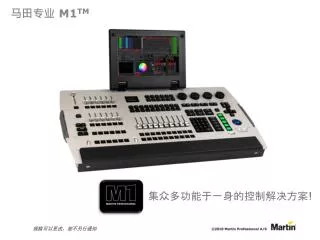
- Overview 12 programmable Function or playback Buttons 16:9 high resolution Industrial Touch screen Grandmaster and bump 4 high resolution digital encoders with push function High quality Trackball for precise movement and mouse cursor Main Go section Extended Playback Section with freely programmable 12 x 40mm faders and 24 buttons Main Playback Section with freely programmable10 x 60mm faders and 40 buttons Programming Section with Numerical Keypad, Command Keys and 5 RGB LCD buttons
- Overview DMX Artnet out 12v desk lamp Network Power in/out and switch DVI output for external monitor 2 Expansion wing connections for MaxModules Optional MIDI ports 4 USB 2 PS2 VGA output for external monitor Audio In/Out 4 DMX out 1 DMX in Connectivity
- Overview
- Overview
- Overview
- Overview
- Overview
- Control surface
- Playback and more! + +
- Playback section I
- Playback section II
- User keys as Playback
- Video touch screen
- Universe expansion
- Hands-on expansion
- Remote control
- Networking
- Software
- Bring together lighting and video
- Parameters control
- Color control
- Fixture library and patch
- Intelligent grouping
- Effect generator
- Global and live timing
- Presets
- Fixture parts
- Cuelist
- Timecode and MIDI
- User layouts, views and settings
- Command line
- DMX-IN
- Artnet management
- RDM management
- Offline programming 32 and 64 bit
- Show file compatibility MaxModuleCerebrum M2GO M1 Maxxyz Pro and Compact M2PCM-PC
- Martin Professional M1TM The all-in-one control solution!






More Related