LANDING
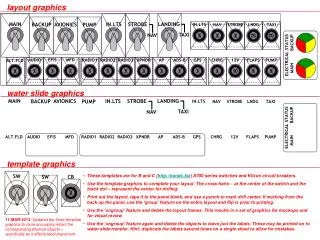
AVIONICS. BACKUP. STROBE. NAV. PUMP. LANDING. TAXI. MAIN. MAIN. LANDING. IN.LTS. STROBE. AVIONICS. BACKUP. PUMP. IN.LTS. NAV. STROBE. LNDG. TAXI. TAXI. NAV. 2. MAIN BACKUP. ELECTRICAL STATUS. IN.LTS. ALT.FLD. AUDIO. EFIS. MFD. RADIO1. RADIO2. RADIO3.

LANDING
E N D
Presentation Transcript
AVIONICS BACKUP STROBE NAV PUMP LANDING TAXI MAIN MAIN LANDING IN.LTS STROBE AVIONICS BACKUP PUMP IN.LTS NAV STROBE LNDG TAXI TAXI NAV 2 MAIN BACKUP ELECTRICAL STATUS IN.LTS ALT.FLD AUDIO EFIS MFD RADIO1 RADIO2 RADIO3 XPNDR AP ADS-B GPS CHRG 12V FLAPS PUMP AUDIO EFIS MFD RADIO1 RADIO2 RADIO3 XPNDR AP ADS-B GPS ALT.FLD 5 5 5 3 3 1 3 1 3 2 5 SW SW CHRG IN.LTS FLAPS 12V PUMP NAV STROBE LNDG TAXI CB ELECTRICAL STATUS 3 5 5 10 5 2 2 7½ 7½ MAIN BACKUP layout graphics water slide graphics template graphics • These templates are for B and C (http://bandc.biz) S700 series switches and Klixon circuit breakers. • Use the template graphics to complete your layout. The cross-hairs - at the center of the switch and the black dot – represent the center for drilling. • Print out the layout, tape it to the panel blank, and use a punch to mark drill center. If working from the back up the panel, use the ‘group’ feature on the entire layout and flip is prior to printing. • Use the ‘ungroup’ feature and delete the layout frames. This results in a set of graphics for mockups and for visual review. • Use the ‘ungroup’ feature again and delete the objects to leave just the labels. These may be printed on to water slide transfer. Hint: duplicate the labels several times on a single sheet to allow for mistakes. 11-MAR-2013: Updated the three template graphics to more accurately reflect the corresponding physical objects – specifically as it affects label placement.