
Overview of Human Systems Integration Metrics (HSI-Metrics) Portal and Methodology
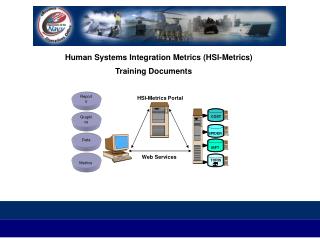
This document provides a comprehensive introduction to the Human Systems Integration Metrics (HSI-Metrics) Portal. It outlines the fundamental methodology, opening screen, account retrieval, and login procedures. Users will learn how to navigate the HSI-Reports menu, assess training effectiveness, and select specific ships and their available training courses. Detailed guidance on course details and listings within the IBFT system is also included, ensuring effective utilization of the HSI-Metrics Portal for optimized training management.

Overview of Human Systems Integration Metrics (HSI-Metrics) Portal and Methodology
E N D
Presentation Transcript
HSI-Metrics Portal ESC F F F F F F F F F F F _ F Insert + Delete Scroll Print 1 2 3 4 5 6 7 8 9 10 11 12 1 2 3 4 5 6 7 8 9 0 - { } | = Q W E R T Y U I O ; : P " ' [ ] \ 2 Z A S X D C G B N H M J , < K . > L ? / Shift V F Shift Enter 1 Alt COST ~ SPIDER IBFT Web Services TORIS ` Tab Alt Human Systems Integration Metrics (HSI-Metrics) Training Documents Reports Graphics Data Metrics
TABLE OF CONTENTS Human Systems Integration Metrics (HSI-Metrics) Introduction and Methodology Introduction Methodology Use of the HSI-Metrics System HSI-Metrics Portal: Opening Screen HSI-Metrics Portal: Obtaining an Account HSI-Metrics Portal: Logging On HSI-Metrics Portal: Selecting the HSI-Reports Menu HSI-Metrics Portal: Selecting Training Effectiveness HSI-Metrics Portal: Selecting the Ships System HSI-Metrics Portal: Selecting a Ship HSI-Metrics Portal: Selecting All Training Available to a System HSI-Metrics Portal: Selecting Course Details HSI-Metrics Portal: Selecting List of All Training Courses in the IBFT to a System or a Ship
![[enter]](https://cdn0.slideserve.com/635908/slide1-dt.jpg)







![[enter]](https://cdn2.slideserve.com/5327398/slide1-dt.jpg)