Introduction to Programming with Drag-and-Drop Blocks
Discover the basics of programming through a user-friendly interface that allows you to drag and drop program blocks from a palette to the sprite area. With eight color-coded block types, including MOTION for movement, CONTROL for starting and repeating actions, and LOOKS, SOUND, and OPERATOR for interactions, creating programs becomes intuitive. You can easily snap blocks together in a specific order to define actions. Additionally, right-clicking on blocks provides access to helpful pop-up menus for guidance, enhancing your programming experience.

Introduction to Programming with Drag-and-Drop Blocks
E N D
Presentation Transcript
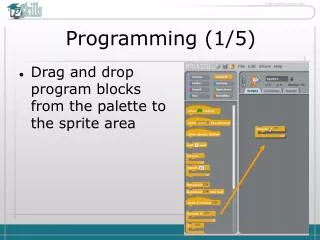
Programming (1/5) • Drag and drop program blocks from the palette to the sprite area
Programming blocks (2/5) • There are 8 types of block all colour coded • Have a table 2 columns 4 rows with each type and a keyword or two underneath eg. MOTION – all movement
To make a program (3/5) • Take some of the blocks and 'snap' them together BUT in a certain order • CONTROL – starting and repeating actions • LOOKS, SOUND, MOTION – the type of movement and action • OPERATOR, SENSING – control movement
Programming style (5/5) • You can get help by right clicking on the block and selecting from the pop-up menu