Understanding Bit Manipulation and Binary Numbers in Programming
This article explores the concepts of bit manipulation and binary numbers, explaining how decimal and binary systems work with powers of 10 and 2 respectively. It covers essential bit operators such as AND, OR, and XOR, and how to apply these in programming using examples. Additionally, the use of flags in a class structure is illustrated, showcasing how individual bits can represent various traits or capabilities, with techniques for turning flags on, off, and toggling them. This foundation is critical for optimizing code in low-level programming.

Understanding Bit Manipulation and Binary Numbers in Programming
E N D
Presentation Transcript
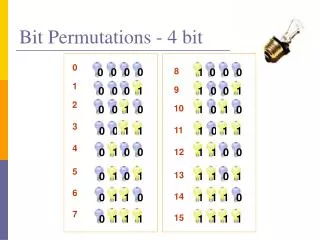
Binary Numbers Base 10 numbers are represented by sum of digits times powers of 10. For example: 234 = 2*102+3*101+4*100 Binary numbers are similar, except that the only digits are 1 and 0, and the digits multiply powers of 2. The string "1011" is binary for the decimal number 11. 1011 = 1*23+0*22+1*21+1*20
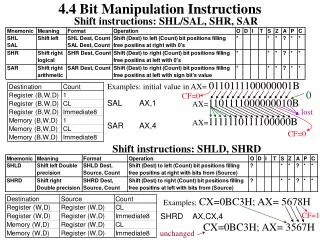
Bit Operators • The "and" operator: (10 & 3) = 2 • Why? It's clearer expressed in binary numbers: 1010 Apply the rules for and based on each& 0011 row independently. Here 1 = True,------ and 0 = False. Thus, 1 & 1 0010 is True and True = True = 1 • The "or" operator: (10 & 3) = 11 • Why? Again, clearer in binary 1010 = 10| 0011 = 3------ 1011 = 11
Bit Operators • The "xor" or "exclusive or" operator: (10 ^ 3) = 9 • Why? 1010^ 0011------ 1001
Flags • Consider a class Monster that has an integer field named traits. Traits will record capabilities of the Monster in individual bits. Bits can be defined with left shift, e.g. • final static int HAS_FLYING = 1<<0; • final static int HAS_INVISIBILITY = 1<<1; • final static int CAN_SWIM = 1<<2; • final static int FIRE_PROOF = 1<<3;
Flags • To turn a flag on:m.traits |= CAN_SWIM; • To turn a flag off:m.traits &= ~CAN_SWIM; • To toggle a flag:m.traits ^= CAN_SWIM; • The tilde operator "~" inverts the bits on an integer.