Download
1 / 40
400 likes | 522 Views
This document explores the need for custom versioning within Eclipse to effectively manage changes, switch between versions, and conduct differential analyses of results. It discusses the internal representation (IR) used to depict code abstract syntax trees (ASTs), outlining its structure, manipulation of IRNodes, and handling of version spaces. Furthermore, it highlights the advantages of versioning in relation to dependency management and persistence, while addressing potential exceptions that may arise when adhering to coding protocols. This comprehensive overview aids developers in leveraging version control for enhanced code stability.

E N D
Why introduce our own versioning? • To capture changes in more detail • To switch back and forth between versions • Good for diffing analysis results • To jump back to a past version, and to start a new branch from there
Other factors • Pro • UWM depends on having it • Precursor to persistence • Con • Exceptions thrown if code is not following protocol correctly
The IR • Internal Representation • Used to represent code ASTs, the version space, and other graph-based structures • Based on objects with attribute-value pairs associated with it • object : IRNode • attribute : SlotInfo (possibly named and/or typed) • value : Object • In fluid.ir
Basic use of the IR n.setSlotValue(si, “This is a test”); LOG.debug(n.getSlotValue(si));
Basic use of the IR SlotInfo si = VersionedSlotFactory.newAttribute() IRNode n = new PlainIRNode(); n.setSlotValue(si, “This is a test”); LOG.debug(n.getSlotValue(si));
Basic use of the IR import fluid.ir.*; org.apache.log4j.LoggerLOG = Logger.getLogger(“DEMO"); SlotInfo si = VersionedSlotFactory.newAttribute() IRNode n = new PlainIRNode(); n.setSlotValue(si, “This is a test”); LOG.debug(n.getSlotValue(si));
Higher-level structure in the IR • Digraph • With or without IRNodes representing edges • Trees • Special support for syntax trees • Sequences (IRSequence) • To support the structures above • Either fixed or variable size (IRArray, IRList) • In fluid.tree
A tree, version 2 A C D
A tree, version 3 A B F C D
A tree, version 4 A B F C D
A tree, version 5 A B F C D
A tree, version 7 A B F C D
A tree, version 6 A B F C D
A tree, version 8 A B F D C
A tree, version 7 A B F C D
A tree, version 9 A B F C D
The version space v0 v7 v8 v9
A tree, version 10 A G B F H C D
Manipulating IR trees tree.setSubtree(A, F); // v4 tree.setSubtree(B, C); // v5 tree.setSubtree(B, D); // v6 tree.setSubtree(A, B); Version v7 = Version.getVersion(); tree.removeSubtree(C); // redundant tree.setSubtree(F, C); Version v8 = Version.getVersion();
Traversing IR trees Enumeration e = tree.bottomUp(A); IRNode b = tree.getSubtree(A, 0); // 0-indexed IRNode c = tree.getSubtree(b, 0); LOG.info(c+” = “+e.nextElement()); IRNode b2 = tree.getParent(c); IRNode d = tree.getChild(b2, 1); LOG.info(d+” = “+e.nextElement()); // If this was a SyntaxTree LOG.info(“d is a “+tree.getOperator(d));
Syntax trees in the IR • Trees with special support for node Operators • Primarily to ensure that subtrees in particular positions have certain Operators • Mostly built using parsers or via methods defined in the specific Operators • Syntax either represented in two ways: • SlotInfos (e.g., names, modifiers) • Subtrees (e.g., fields, statements, parameters) • Syntax accessed via methods defined in each Operator • In fluid.parse, fluid.java, fluid.java.operator
Creating syntax trees // this.a = b IRNode base = ThisExpression.prototype.jjtCreate(); IRNode lval = FieldRef.createNode(base, “a”); IRNode rval = UseExpression.createNode(“b”); IRNode expr = AssignExpression.createNode(lval, rval); LOG.info(DebugUnparser.toString(expr));
Traversing syntax trees // expr is “this.a = b” Operator op = tree.getOperator(expr); if (AssignExpression.includes(expr)) { // instead of getSubtree or getChild IRNode lhs = AssignExpression.getLhs(expr); op = tree.getOperator(lhs); if (FieldRef.includes(op)) { LOG.info(“Accessing field “+FieldRef.getId(lhs)); } }
Details about the IR • IRNodes can participate in multiple IR structures at once • e.g., a SyntaxTree and a CFG • However, the default SyntaxTree used by the Operators is JJNode.tree • Limitations on IRSequences influence the structure of the syntax trees • Nodes either have a fixed or a variable number of subcomponents • e.g., a ClassDeclaration node has exactly three: • A NamedType node that it extends • An Implements node with a variable number of NamedType children • A ClassBody node with a variable number of ClassBodyDeclaration s
Versioning in the IR • Mostly transparent to code that accesses or manipulates IR • getSlotValue() consults the current Version if the structure is versioned • New versions created for every change • A Version is global and includes the state of all versioned IR • Each thread has its own “current” Version • Initialized to the initial version (not inherited) • Manipulated via calls on Version • In fluid.version
Versioning in Eclipse • Multiple threads need to coordinate access to IR, so previously loaded code is preserved • Simplest to simulate a global “current” version • Two components • VersionSpaceModel to keep track of Versions of possible interest (usually after completed operations) • VersionMarkerModel to keep track of the current Version • In fluid.eclipse.Eclipse, cspace.mvc.version
Manipulating syntax trees in Eclipse modManager = Eclipse.getDefault().getModManager(); modManager.executeAtomically(new Runnable() { public void run() { IRNode base = ThisExpression.prototype.jjtCreate(); IRNode lval = FieldRef.createNode(base, “a”); IRNode rval = UseExpression.createNode(“b”); IRNode expr = AssignExpression.createNode(lval, rval); … } });
Manipulating syntax trees in Eclipse cursor = Eclipse.getDefault().getVersionCursor(); cursor.executeWithin(new Runnable() { public void run() { … } });
Traversing syntax trees in Eclipse cursor = Eclipse.getDefault().getVersionCursor(); try { Version.saveVersion(); Version.setVersion(cursor.getVersion()); … // Designed for read-only access to IR // Any changes are discarded } finally { Version.restoreVersion(); }
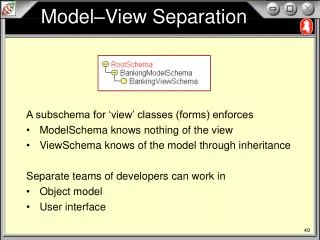
Models • A set of IRNodes • Possibly structured as a Set, Sequence, or Forest • A set of attributes registered with the Model • Associated with either the model (component) or the nodes • Identified with a name (usually a constant String) • Represented as a named SlotInfo with an IRType • Ex: VersionSpaceModel interface • A ForestModel with three custom attributes • VERSION: the Version that the node represents • VNAME: a String label associated with that version • CURSORS: an IRSequence of dependent VersionCursorModels
Views • Objects depending on Models • To receive ModelEvents from Models • To access the Model state • StatefulViews also export Model interface(s) • Possibly the same or different • Ex: VersionCursorModel • Extends VersionSpaceToVersionTrackerModel • Exports a component attribute VersionTracker.VERSION • Constrained to hold a version from its VersionSpaceModel
A simple Model-View chain VersionSpace VersionCursor
Another Model-View chain VersionSpace SyntaxForest VersionCursor FixedProjectionForest ConfigurableForest …
Another Model-View chain (2) VersionSpace SyntaxForest VersionCursor FixedProjectionForest SimplePredicateView ConfigurableForest PredicateBasedVisibilityView
Model-View packages cspace.mvc cspace.mvc.sequence cspace.mvc.set cspace.mvc.tree cspace.mvc.tree.syntax cspace.mvc.version cspace.mvc.attr cspace.mvc.predicate cspace.mvc.visibility cspace.mvc.diff …
Model-View in Eclipse • Eclipse.getVersionSpace() • Eclipse.getVersionCursor() • Eclipse.getForestModel() • Same as Eclipse.getTree(), except returning it as a different type • Eclipse.getConfigurableView() • Creates a new Model-View chain for each call • Unlike the above, which return a prototype
Creating a Model-View chain ForestModel fm = StandardPureForestFactory.mutablePrototype.create(“unique”, VersionedSlotFactory.prototype); VersionTrackerModel tracker = VersionMarkerFactory.prototype.create(“unique2”, Version.getInitialVersion()); SyntaxTreeInterface tree = FixedVersionForestProjectionFactory.prototype .create(“unique3”, fm, tracker); … Ex: cspace.mvc.examples.SimpleForestApp
Customizing an Model-View chain • Adding Views to any point in a chain • Altering parameters for a Model or View • VersionCursorModel.setFollowing(false) • Creating a plugin for an existing View • ForestEllipsisPolicy • Extending an existing Model or View • LabeledForest • Creating a new Model / View